Inference Provider Routing
Route requests to the best inference provider
Infron AI routes requests to the best available providers for your model.

By default, requests are load balanced across the top providers to maximize uptime and best price.
You can customize how your requests are routed using the provider object in the request body for Chat Completions and Completions.
The provider object can contain the following fields:
number | object
-
Preferred minimum throughput (tokens/sec). Can be a number or an object with percentile cutoffs (p50, p75, p90, p99).
number | object
-
Preferred maximum latency (seconds). Can be a number or an object with percentile cutoffs (p50, p75, p90, p99).
Cost-effective Load Balancing (Default Strategy)
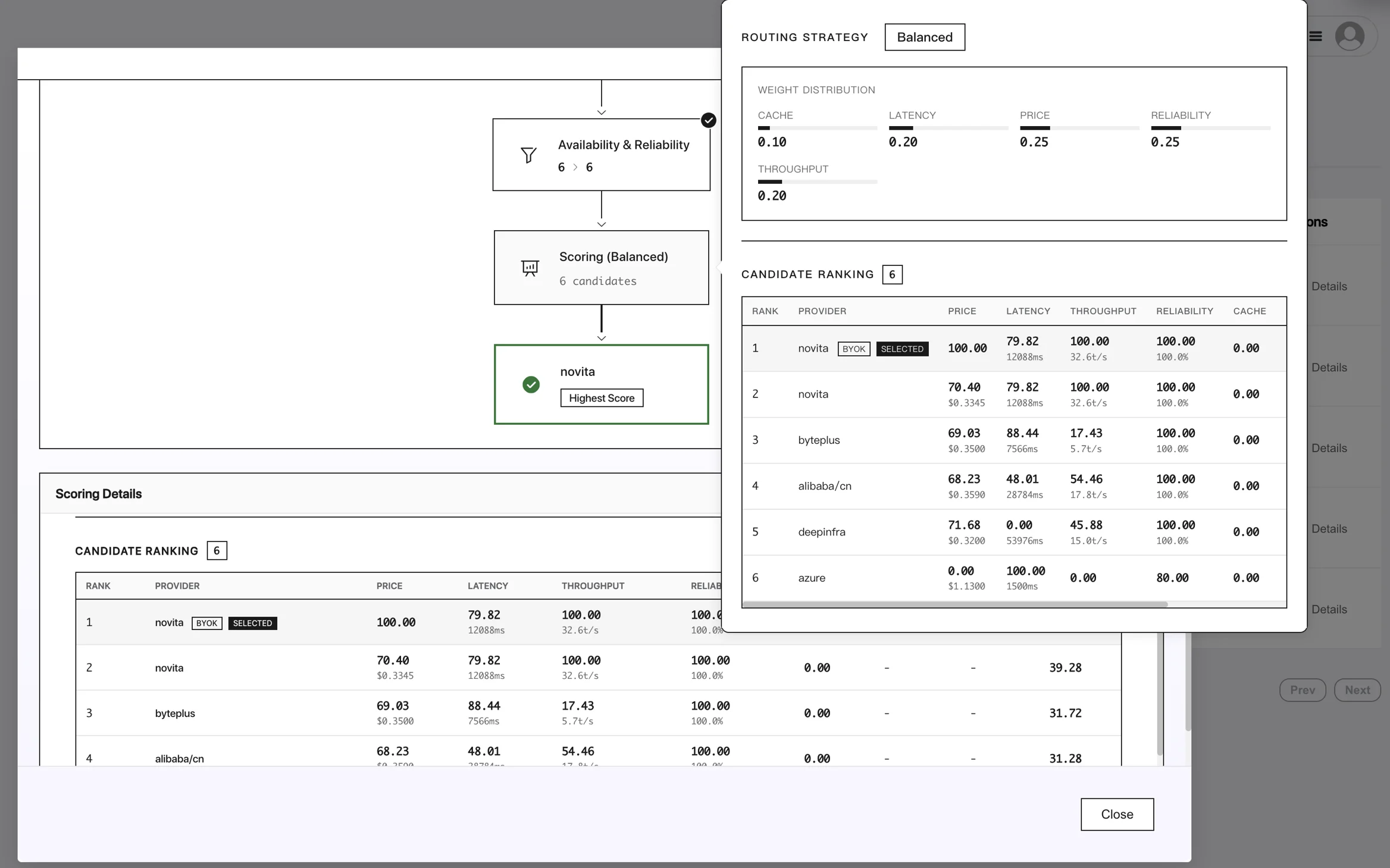
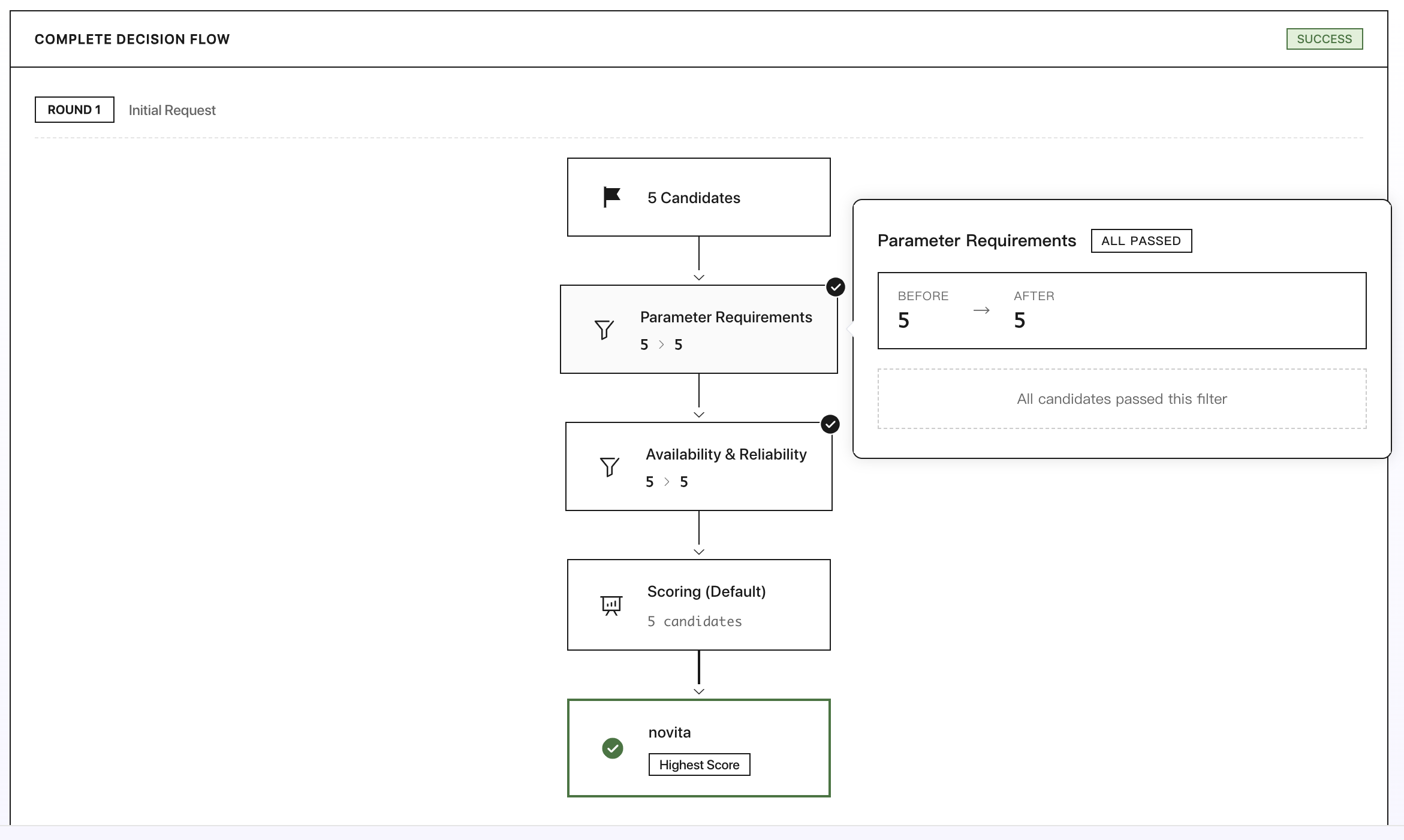
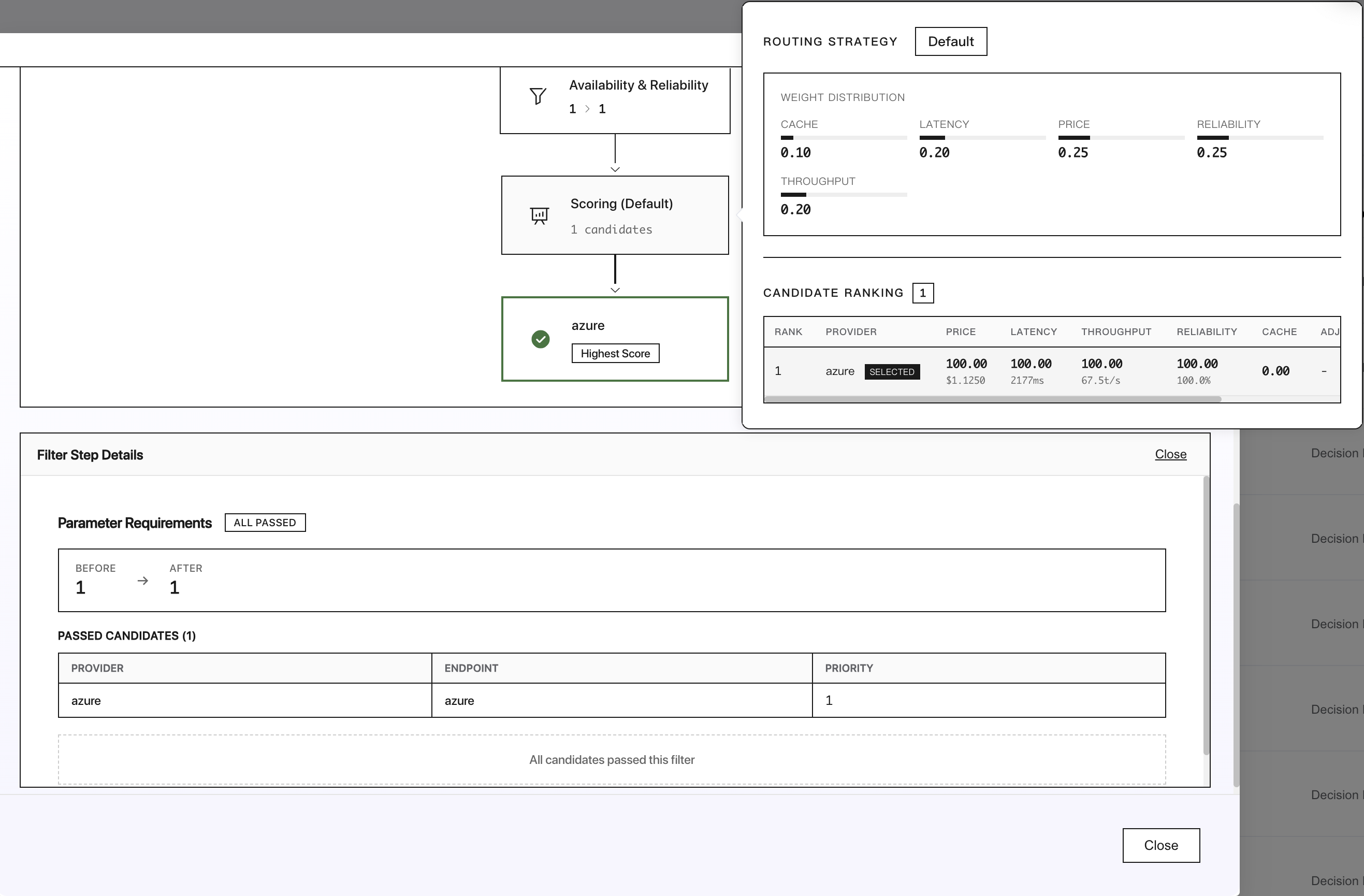
For each model in your request, Infron's default behavior is to load balance requests across providers, balancing the best throughput, lowest latency, and lowest price.

When you send a model request, Infron automatically evaluates multiple providers in real time. It considers factors such as latency, throughput, reliability, and price—based on the default weight distribution shown above.
For instance, if Provider A offers slightly higher throughput but at a higher cost, while Provider B is more affordable with moderate latency, Infron will intelligently balance requests across both to achieve the best overall performance and cost efficiency.

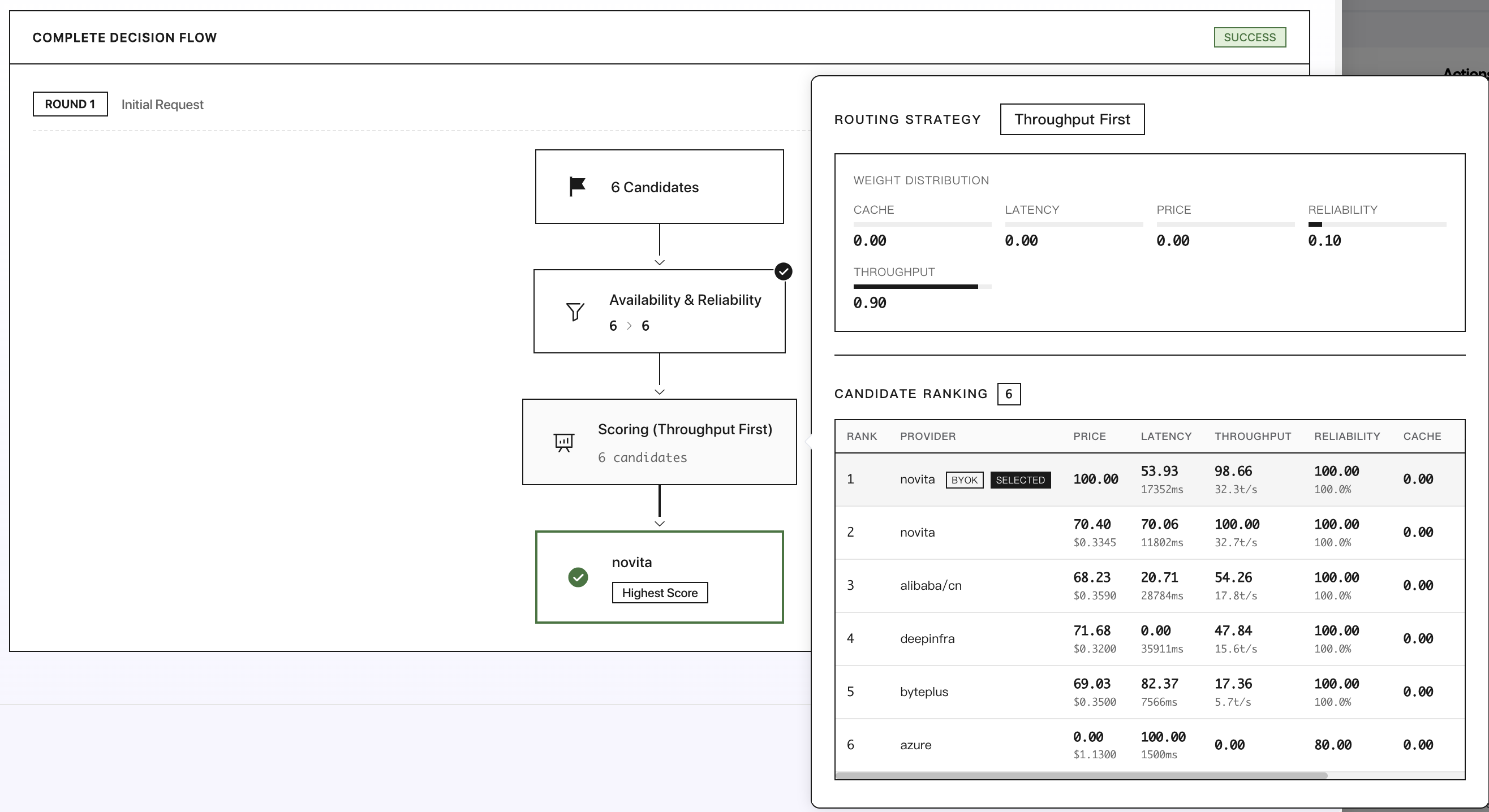
If you are more sensitive to throughput than price, you can use the sort field to explicitly prioritize throughput.
If you have sort or order set in your provider preferences, load balancing default strategy will be disabled.
Ordering Specific Providers (order)
You can set the providers that Infron AI will prioritize for your request using the order field.
order
string[]
-
List of provider slugs to try in order (e.g. ["anthropic", "openai"]).
Infron AI will prioritize providers in this order, for the model you're using. If you don't set this field, the router will use the default strategy.
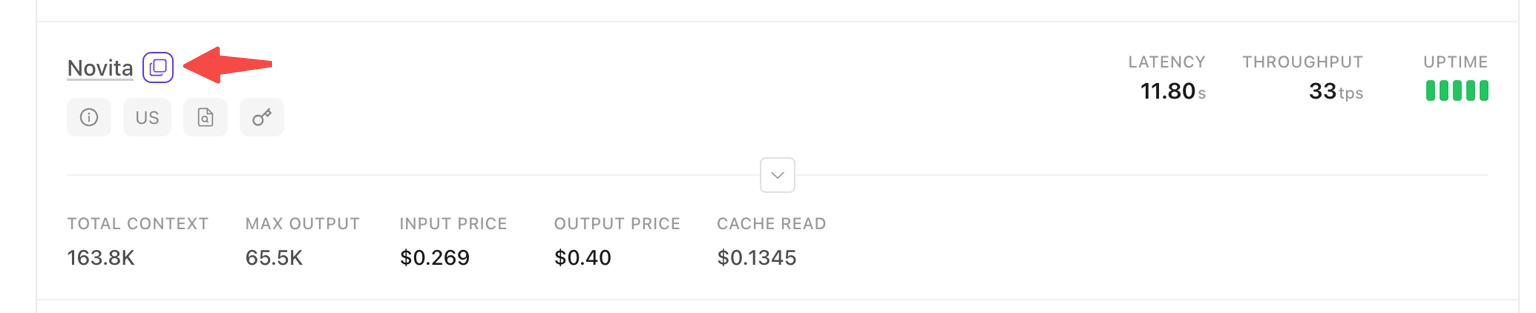
You can use the copy button next to provider names on model pages to get the exact provider slug, for example like "anthropic"、"openai"、“novita”

Order example (enable allow_fallbacks by default):
azureis hosting the "anthropic/claude-sonnet-4.5"anthropicis hosting the "anthropic/claude-sonnet-4.5"openaiis hosting the "anthropic/claude-sonnet-4.5"
You set the order filed as ["anthropic", "openai"], and you're calling the "anthropic/claude-sonnet-4.5" model.
If Provider
anthropicfails, then Provideropenaiwill be tried next.If Provider
openaialso fails, thenbackup provider(may be azure) will be tried last.
Infron will try all the providers which are specified in order one at a time, and proceed to other backup providers if none are operational.
If you don't want to allow any other providers, you should disable allow_fallbacks as well.
Order example (disable allow_fallbacks by default):
azureis hosting the "anthropic/claude-sonnet-4.5"anthropicis hosting the "anthropic/claude-sonnet-4.5"openaiis hosting the "anthropic/claude-sonnet-4.5"
You set the order filed as ["anthropic", "openai"], and you're calling the "anthropic/claude-sonnet-4.5" model.
You set the allow_fallbacks as false.
If Provider
anthropicfails, then Provideropenaiwill be tried next.If Provider
openaialso fails, then this request willfailsfinally.
Example: Specifying providers with fallbacks
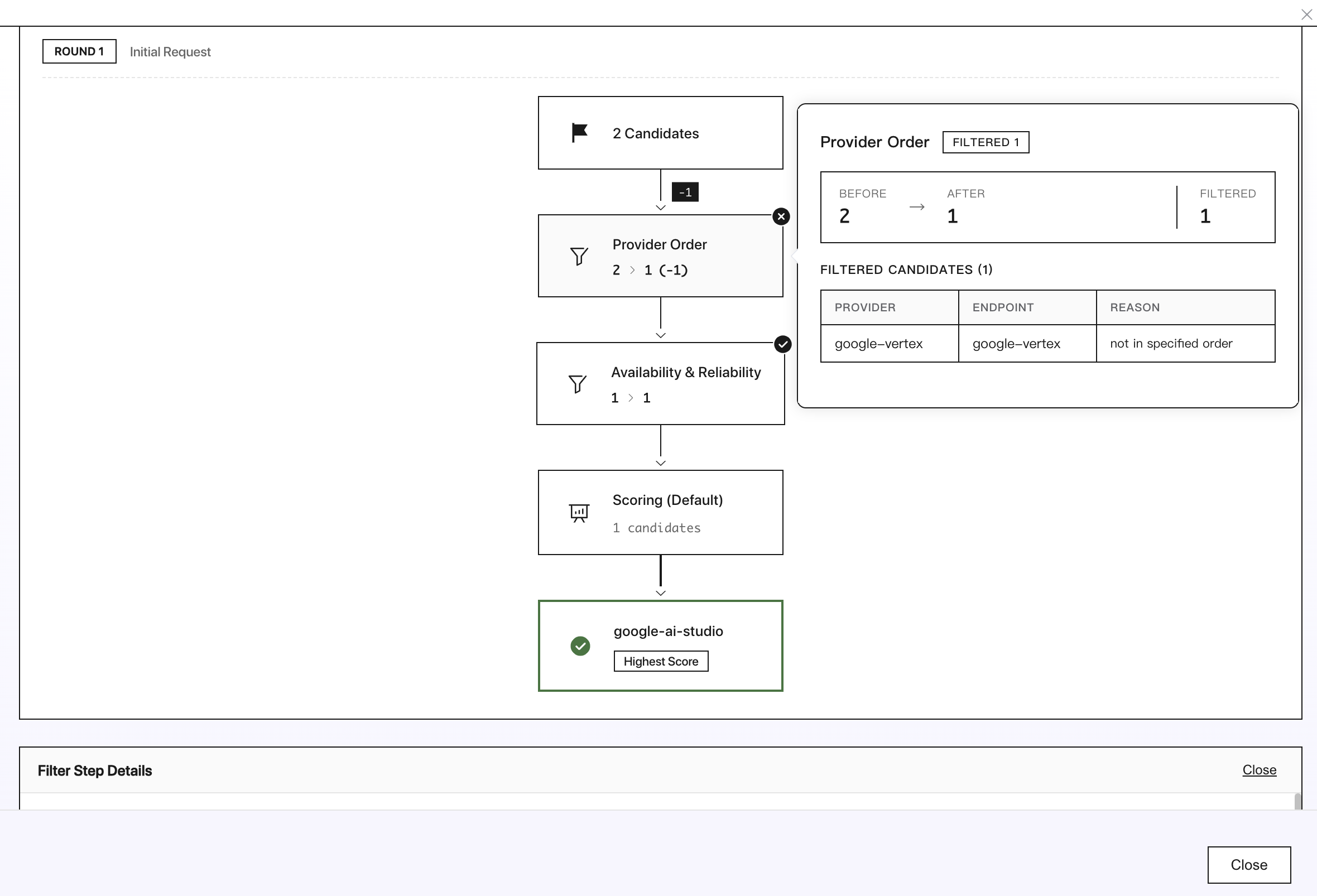
In the example below, your request will first be sent to Google AI Studio, and only when Google AI Studio experiences a serious outage will the request be forwarded to Google Vertex.
Example: Specifying providers with fallbacks disabled
Here's an example with allow_fallbacks set to false,your request will first be sent to Google AI Studio, and then fails if Google AI Studio fails

Example: Targeting Specific Provider Endpoints
Each provider on Infron may host multiple endpoints for the same model, such as a default endpoint and a specialized "quantizations" endpoint. To target a specific endpoint, you can use the copy button next to the provider name on the model detail page to obtain the exact provider slug.
For example, MiniMax offers MiniMax M2.1 through multiple endpoints:
Default endpoint with slug
minimax/fp8Lightning endpoint with slug
minimax/lightning
By copying the exact provider slug and using it in your request's order array, you can ensure your request is routed to the specific endpoint you want:
This approach is especially useful when you want to consistently use a specific variant of a model from a particular provider.
Provider Sorting (sort)
If you instead want to explicitly prioritize a particular provider attribute, you can include the sort field in the provider preferences. Default strategy will be disabled, and the router will try providers in order.
The three sort options are:
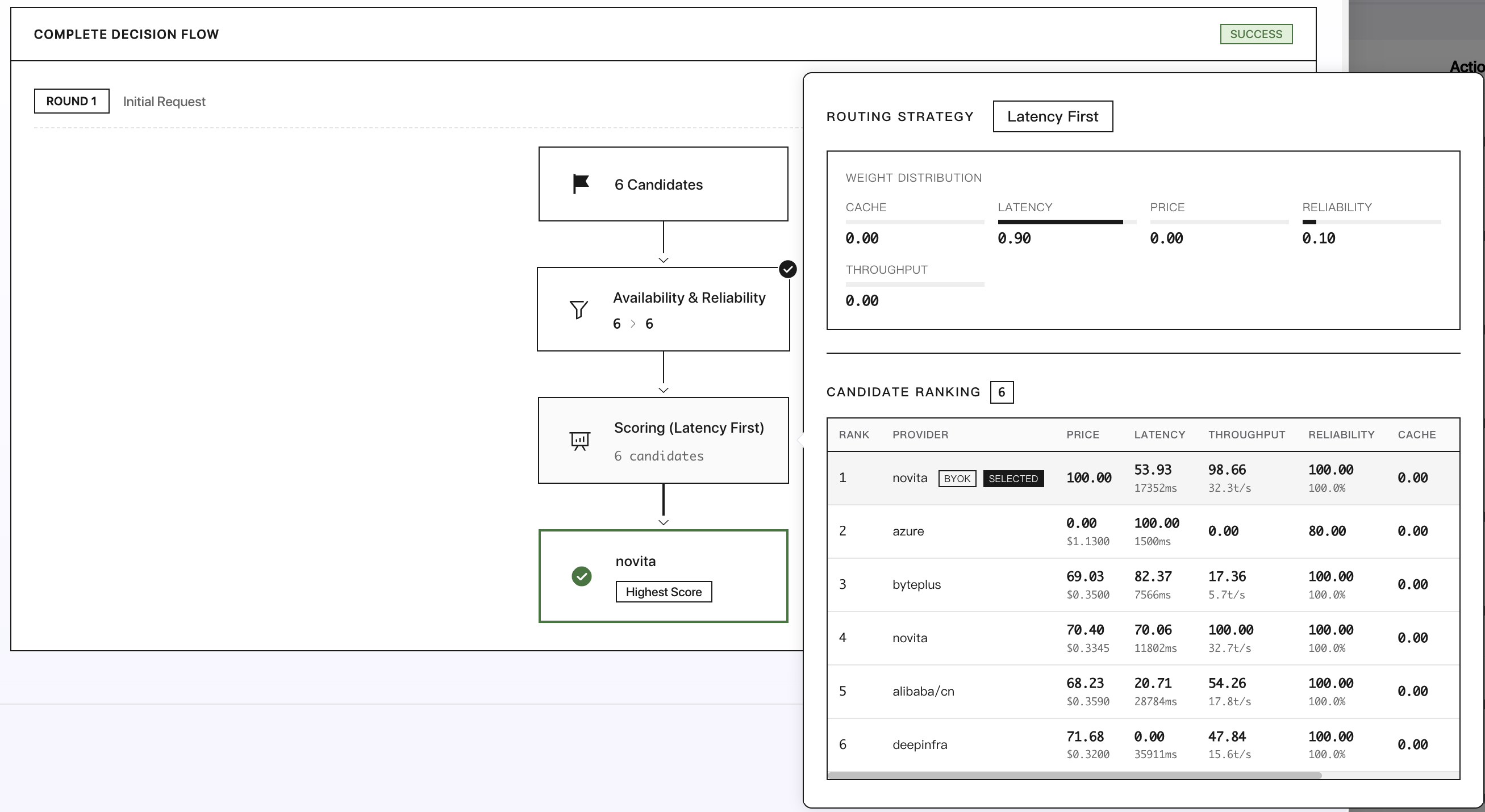
"price": prioritize lowest price"throughput": prioritize highest throughput"latency": prioritize lowest latency
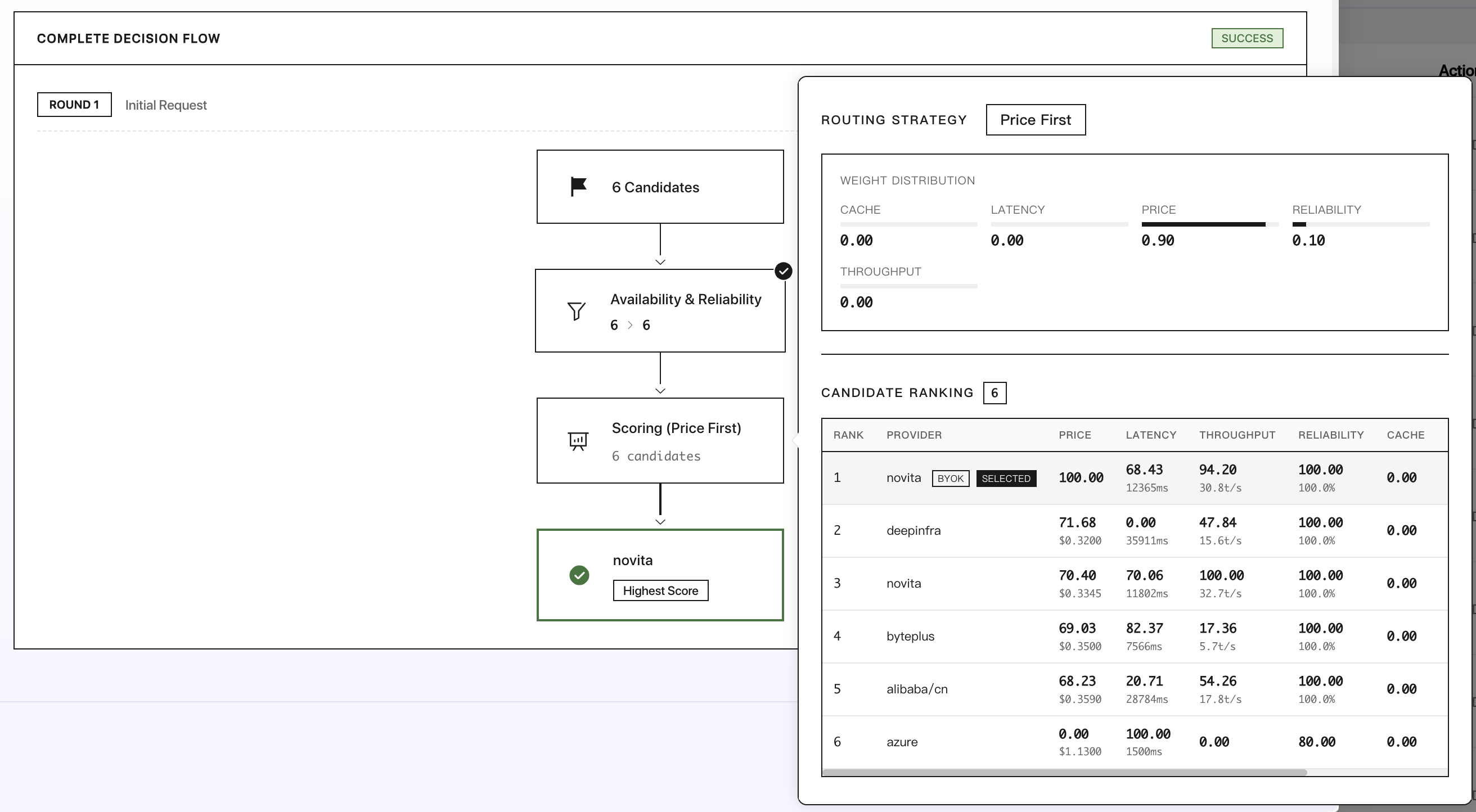
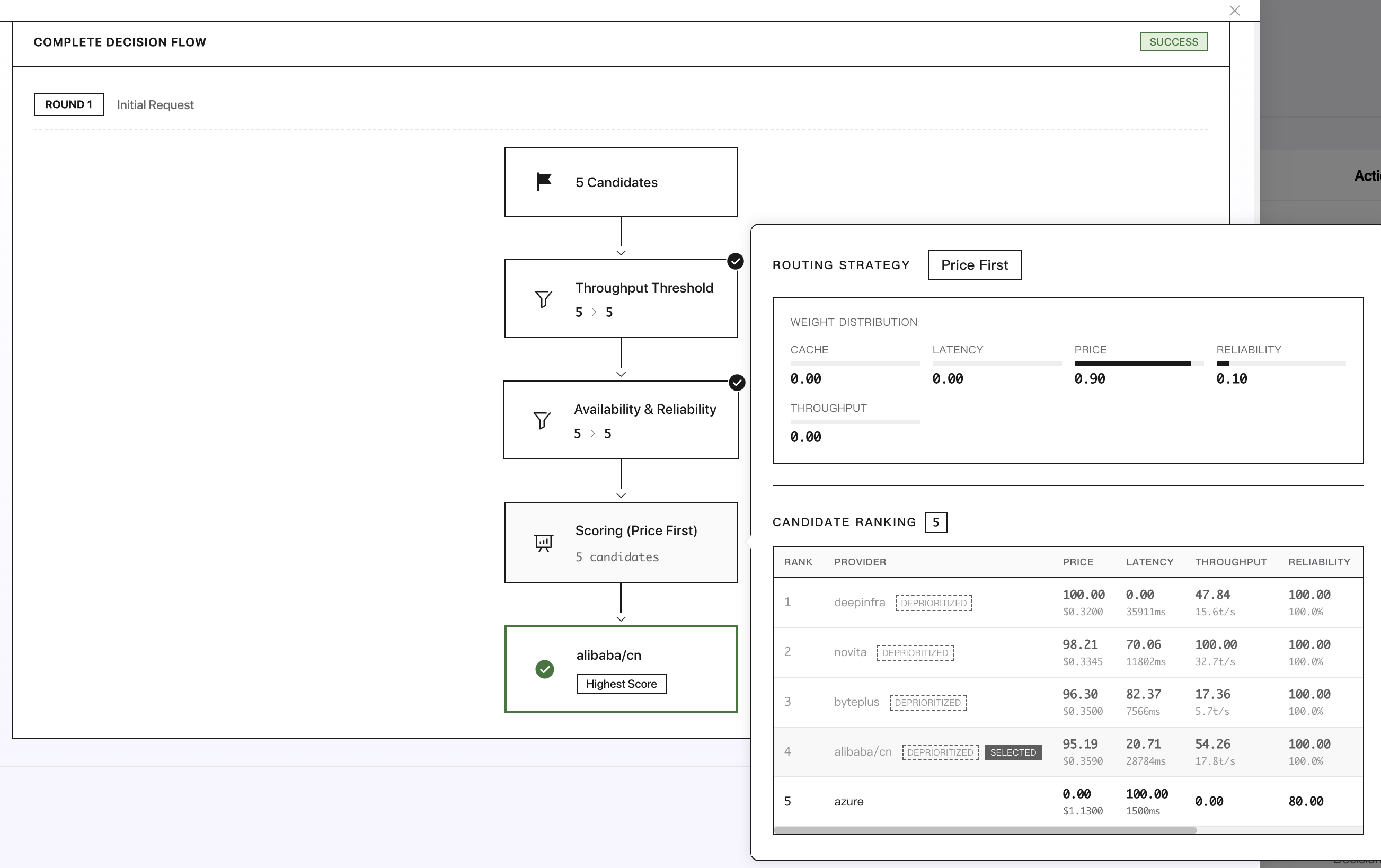
To always prioritize low prices, set
sortto"price".

To always prioritize highest throughput, set
sortto"throughput".

To always prioritize low latency, set
sortto"latency".

Performance Thresholds (preferred_min_throughput / preferred_max_latency)
You can set minimum throughput or maximum latency thresholds to filter endpoints.
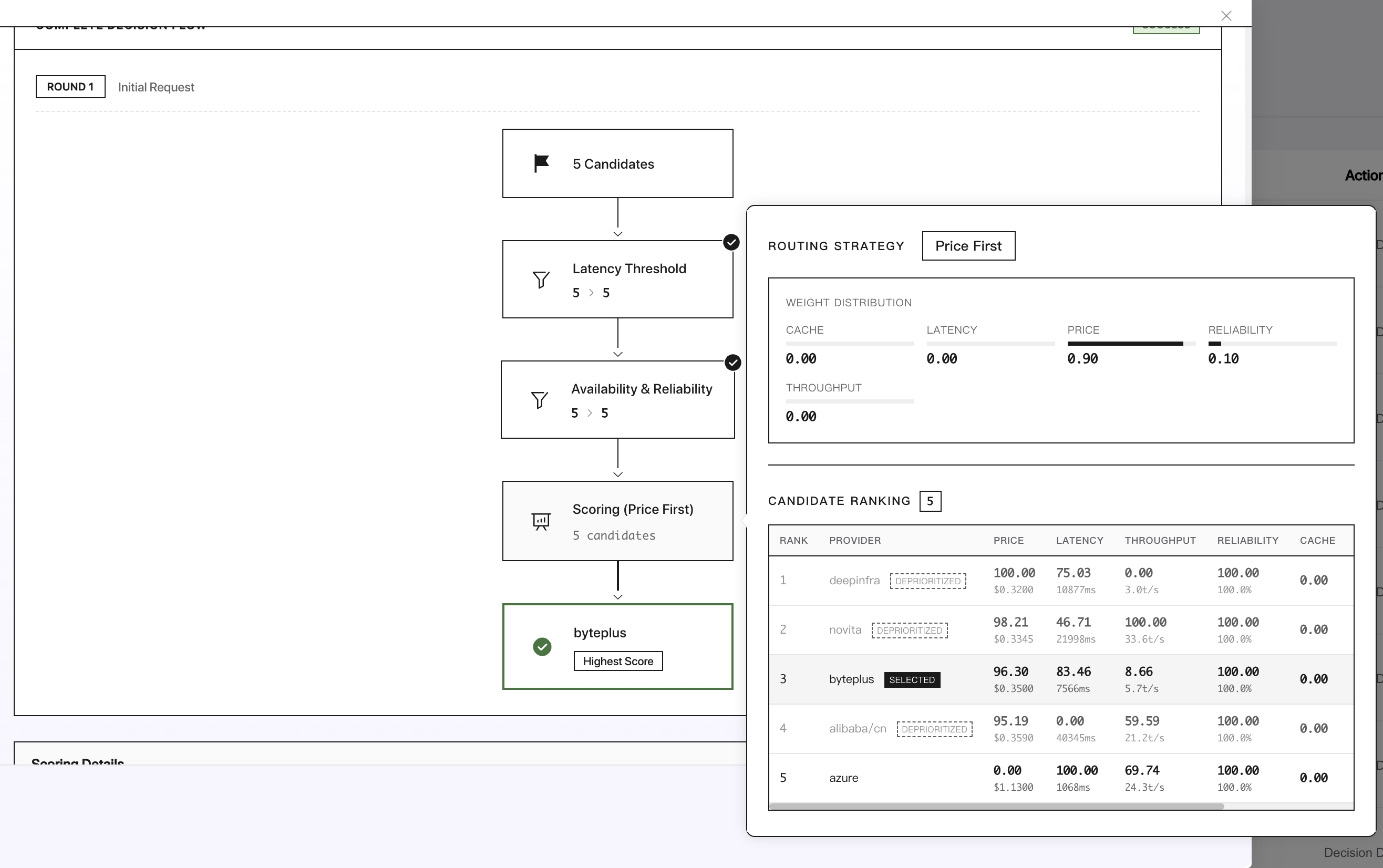
Endpoints that don't meet these thresholds are deprioritized (moved to the end of the list) rather than excluded entirely.
preferred_min_throughput
number | object
-
Preferred minimum throughput in tokens per second.
Can be
a number (applies to p50)or an
objectwithpercentile cutoffs.
preferred_max_latency
number | object
-
Preferred maximum latency in seconds.
Can be
a number (applies to p50)or an
objectwithpercentile cutoffs.
How Percentiles Work
Infron tracks latency and throughput metrics for each model and provider using percentile statistics calculated over a rolling 5-minute window. The available percentiles are:
p50 (median): 50% of requests perform better than this value
p75: 75% of requests perform better than this value
p90: 90% of requests perform better than this value
p99: 99% of requests perform better than this value
Higher percentiles (like p90 or p99) give you more confidence about worst-case performance, while lower percentiles (like p50) reflect typical performance. For example, if a model and provider has a p90 latency of 2 seconds, that means 90% of requests complete in under 2 seconds.
When to Use Percentile Preferences
Percentile-based routing is useful when you need predictable performance characteristics:
Real-time applications: Use p90 or p99 latency thresholds to ensure consistent response times for user-facing features
Batch processing: Use p50 throughput thresholds when you care more about average performance than worst-case scenarios
SLA compliance: Use multiple percentile cutoffs to ensure providers meet your service level agreements across different performance tiers
Cost optimization: Combine with
sort: "price"to get the cheapest provider that still meets your performance requirements
Example: Find the Cheapest Model Meeting Performance Requirements
Combine 'sort': 'price' with performance thresholds to find the cheapest option that meets your performance requirements. This is useful when you have a performance floor but want to minimize costs.

In this example, Infron will find the cheapest provider that has at least 50 tokens/second throughput at the p90 level (meaning 90% of requests achieve this throughput or better). Providers below this threshold are still available as fallbacks if all preferred options fail.
You can also use preferred_max_latency to set a maximum acceptable latency:

Example: Using Multiple Percentile Cutoffs
You can specify multiple percentile cutoffs to set both typical and worst-case performance requirements. All specified cutoffs must be met for a provider to be in the preferred group.
Requiring Providers to Support All Parameters (require_parameters)
You can restrict requests only to providers that support all parameters in your request using the require_parameters field.
When you send a request with `tools` or `tool_choice`, Infron will only route to providers that support tool use. Similarly, if you set a `max_tokens`, then Infron will only route to providers that support a response of that length.
require_parameters
boolean
true
Only use providers that support all parameters in your request.
With the default routing strategy (set
require_parameterstotrue), providers that don't support all the LLM parameters specified in your request can still receive the request, but will ignore unknown parameters.When you set
require_parameterstofalse, the request won't even be routed to that provider.
Example: Excluding providers that don't support JSON formatting
For example, to only use providers that support JSON formatting:

Requiring Providers to Comply with Data Policies (data_collection)
You can restrict requests only to providers that comply with your data policies using the data_collection field.
data_collection
"allow" | "deny"
"allow"
Control whether to use providers that may store data.
allow: (default) allow providers which store user data non-transiently and may train on itdeny: use only providers which do not collect user data
Some model providers may log prompts, so we display them with a Data Policy tag on model pages. This is not a definitive source of third party data policies, but represents our best knowledge.
Example: Excluding providers that don't comply with data policies
To exclude providers that don't comply with your data policies, set data_collection to deny:
Zero Data Retention Enforcement (zdr)
You can enforce Zero Data Retention (ZDR) on a per-request basis using the zdr parameter, ensuring your request only routes to endpoints that do not retain prompts.
zdr
boolean
falses
Restrict routing to only ZDR (Zero Data Retention) endpoints.
When
zdris set totrue, the request will only be routed to endpoints that have a Zero Data Retention policy.When
zdrisfalseor not provided, it has no effect on routing.
Example: Enforcing ZDR for a specific request
To ensure a request only uses ZDR endpoints, set zdr to true:
This is useful for customers who don't want to globally enforce ZDR but need to ensure specific requests only route to ZDR endpoints.
Distillable Text Enforcement (enforce_distillable_text)
You can enforce distillable text filtering on a per-request basis using the enforce_distillable_text parameter, ensuring your request only routes to models where the author has allowed text distillation.
enforce_distillable_text
boolean
false
Restrict routing to only models that allow text distillation.
When
enforce_distillable_textis set totrue, the request will only be routed to models where the author has explicitly enabled text distillation.When
enforce_distillable_textisfalseor not provided, it has no effect on routing.
This parameter is useful for applications that need to ensure their requests only use models that allow text distillation for training purposes, such as when building datasets for model fine-tuning or distillation workflows.
Example: Enforcing distillable text for a specific request
To ensure a request only uses models that allow text distillation, set enforce_distillable_text to true:
Disabling Fallbacks (allow_fallbacks)
Example: Always choose the cheapest provider with fallbacks disabled
To guarantee that your request is only served by the lowest-cost provider, you can disable fallbacks.
This is combined with the order field to restrict the providers that Infron will prioritize to just your chosen list.
Example: Always choose the specific providers with fallbacks disabled
Here's an example with allow_fallbacks set to false,your request will first be sent to Google AI Studio, and then fails if Google AI Studio fails
Allowing Only Specific Providers (only)
You can allow only specific providers for a request by setting the only field in the provider object.
only
string[]
-
List of provider slugs to allow for this request.
Only allowing some providers may significantly reduce fallback options and limit request recovery.
Example: Only allow Azure for a request calling GPT-4 Omni
Here's an example that will only use Azure for a request calling GPT-4 Omni:

Ignoring Providers (ignore)
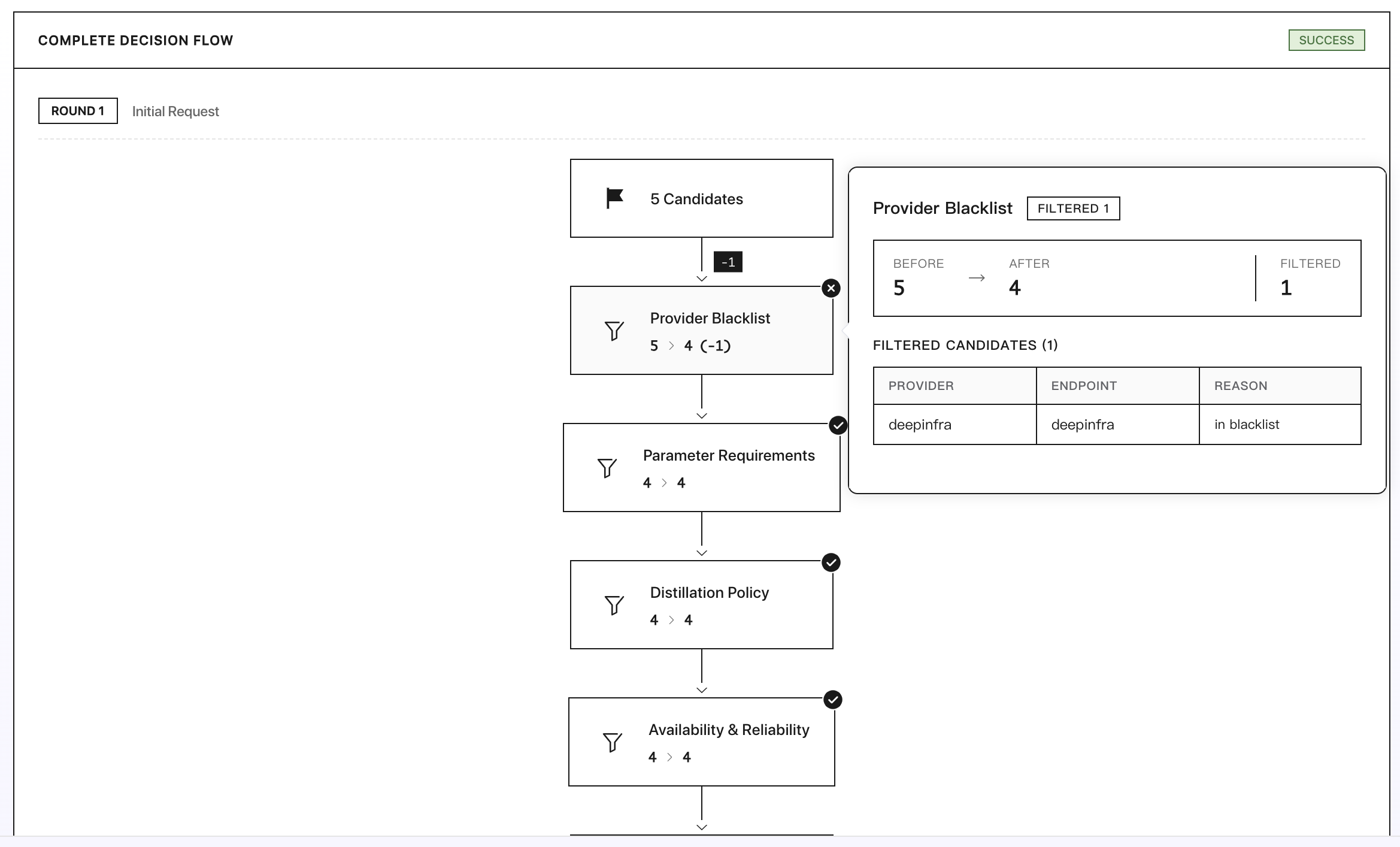
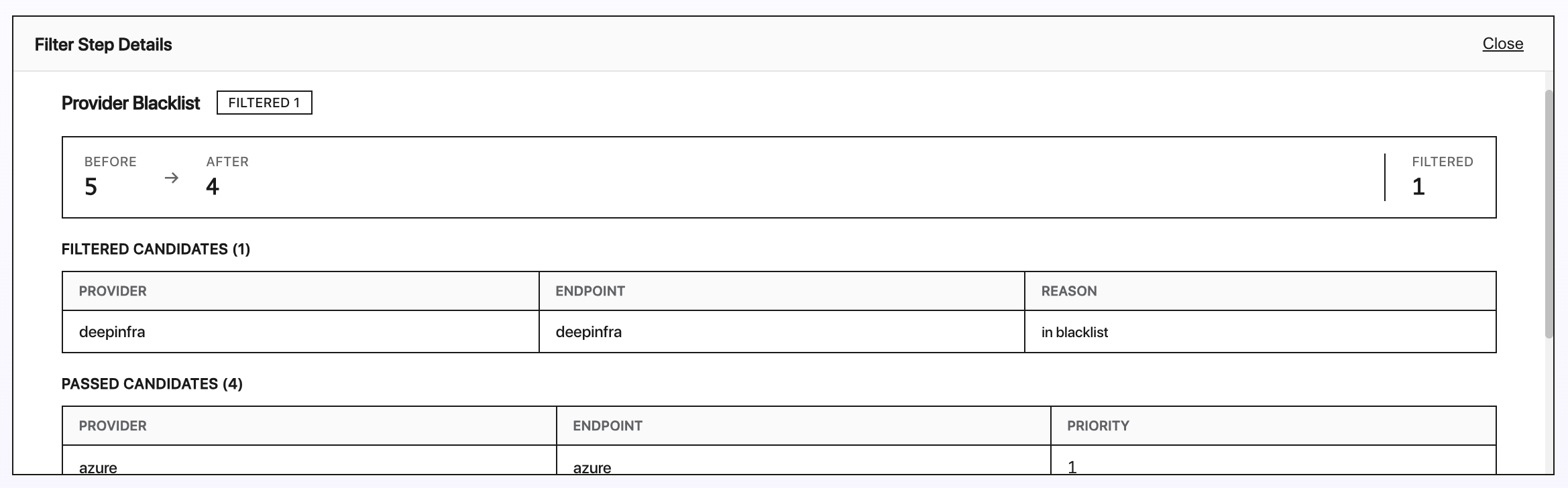
You can ignore providers for a request by setting the ignore field in the provider object.
ignore
string[]
-
List of provider slugs to skip for this request.
Ignoring multiple providers may significantly reduce fallback options and limit request recovery.
Example: Ignoring some provider for a request
Here's an example that will ignore some provider:


Quantization (quantizations)
Quantization reduces model size and computational requirements while aiming to preserve performance. Most LLMs today use FP16 or BF16 for training and inference, cutting memory requirements in half compared to FP32. Some optimizations use FP8 or quantization to reduce size further (e.g., INT8, INT4).
quantizations
string[]
-
List of quantization levels to filter by (e.g. ["int4", "int8"]).
Quantized models may exhibit degraded performance for certain prompts, depending on the method used.
Providers can support various quantization levels for open-weight models.
Quantization Levels
To filter providers by quantization level, specify the quantizations field in the provider parameter with the following values:
int4: Integer (4 bit)int8: Integer (8 bit)fp4: Floating point (4 bit)fp6: Floating point (6 bit)fp8: Floating point (8 bit)fp16: Floating point (16 bit)bf16: Brain floating point (16 bit)fp32: Floating point (32 bit)unknown: Unknown
Example: Requesting FP8 Quantization
Here's an example that will only use providers that support FP8 quantization:
Last updated