Prompt Cache in Infron
How to Fix LLM Prompt Cache Hit Rate and Cut Input Costs by 30–50%

Most teams chasing LLM cost reductions focus on the obvious: switch to a cheaper model, shorten outputs, batch requests. These are all valid. But there is a lever that gets consistently underutilized, one that can cut input token costs by 30–50% without touching your model, your prompts, or your output quality.
It is called Prompt Caching. The reason most teams underuse it is not that they do not know it exists. It is that it is easy to configure incorrectly and when it is configured incorrectly, the cache hit rate is zero. Silently.
How Prompt Caching Reduces LLM API Costs
Every time you send a request, the model processes your entire input from scratch: system prompt, conversation history, few-shot examples, everything. That processing costs tokens.
Prompt caching stores the computational work from a previously processed token sequence. On subsequent requests that begin with the same prefix, the model skips reprocessing those tokens and reads from cache instead. Cached tokens cost a fraction of standard input pricing, typically 10% of the original input rate, which means up to 90% savings on those tokens and time-to-first-token drops because less computation is required.
The economics compound quickly. A customer service application with a 3,000-token system prompt running 100,000 requests per day pays for 300 million input tokens daily. With a stable 35% cache hit rate, 105 million of those tokens stop being billed at full price — every day.
Why Your Prompt Cache Hit Rate Is Lower Than It Should Be
This is where most implementations fall apart. Prompt caching is prefix-based: the cache only applies to the beginning of your prompt that has not changed between requests. The moment anything in the cached prefix differs, the cache is invalidated from that point forward.
This sounds straightforward. In practice, there are several ways it breaks silently.
Prompt assembly order matters more than you think
If your code assembles the system prompt dynamically injecting the current date, the user's name, or any session-specific variable near the beginning, you have ensured the cache never hits. The prefix changes on every request. The fix is structural: stable content must come first. Variable content must come last.
Whitespace and formatting changes invalidate the cache
A trailing space, a newline added by a template engine, a slightly different JSON serialization of the same object, any of these produce a different token sequence and cause a cache miss. This is especially common when prompts are assembled programmatically from multiple sources.
Provider switching resets the cache
Each provider maintains its own independent cache. Switching from one provider to another mid-session means starting cold on the new provider, even if the previous one had a warm cache for that prefix. This is a hidden cost of multi-provider routing that most teams do not account for.
Cache TTL varies and goes cold overnight
Some providers expire cached prefixes after a few minutes of inactivity. If your traffic is bursty, heavy during business hours, quiet overnight. You may be paying full price for the first requests each morning because the cache expired while the system was idle.
What a Healthy Prompt Cache Hit Rate Actually Looks Like
To understand what functional caching looks like in practice, here is data from a controlled test designed to isolate cache behavior.
Test setup:
Fixed prefix: approximately 4,000 tokens (a detailed system prompt and context)
Variable suffix: 128 random tokens appended to each request, simulating user input
Requests: 100 sequential calls
Metric: cached tokens divided by total prompt tokens per request
Results:
Requests 1 and 2 returned a 0% cache hit rate, expected, as the cache is cold. From request 3 onward, the hit rate stabilized at 33–35% and remained there with less than 2% variance across all 100 requests.
The 33–35% figure reflects the math: the fixed 4,000-token prefix accounts for roughly 97% of the prompt, and the 128-token variable suffix accounts for the rest. The cache correctly identifies and serves the stable portion. Variable tokens are never cached, they change on every request by design.
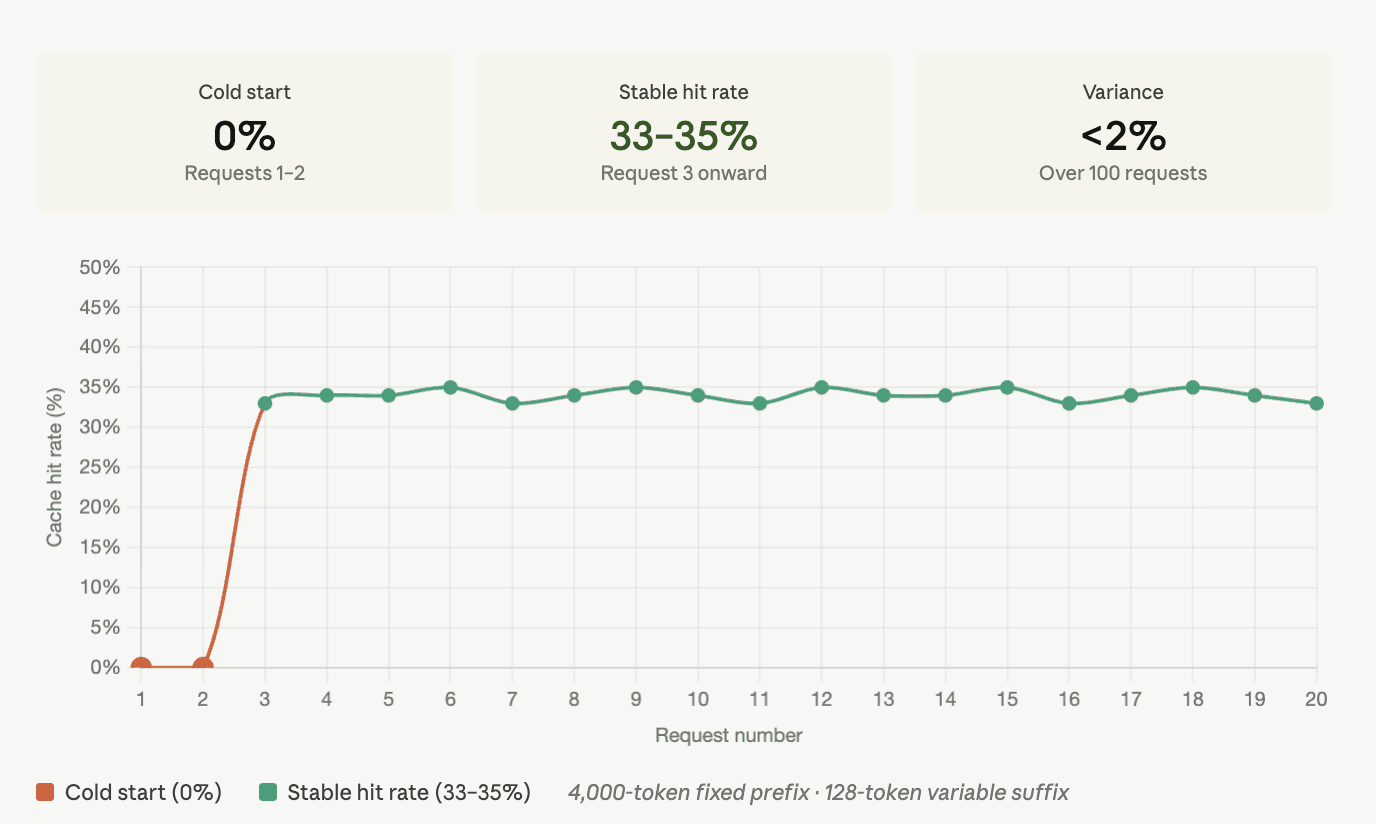
Two things to pay attention to: the speed of cache warmup (by the third request, not the thirtieth) and the stability of the hit rate (less than 2% variance over 100 requests). An unstable hit rate, one that fluctuates between 10% and 35% unpredictably is the signature of a caching implementation that is breaking on whitespace, parameter changes, or provider routing inconsistencies.
Estimated cost impact: With a 33.5% cache hit rate and cached tokens priced at 10% of standard input cost, the effective input token cost drops by roughly 30%. On a workload spending $10,000 per month on input tokens, that is $3,000 back before any other optimization.
How to Structure LLM Prompts for Maximum Cache Hit Rate
The prompt structure that maximizes cache hits follows one principle: stable content first, variable content last.
In practice, your prompt layers should be ordered like this:
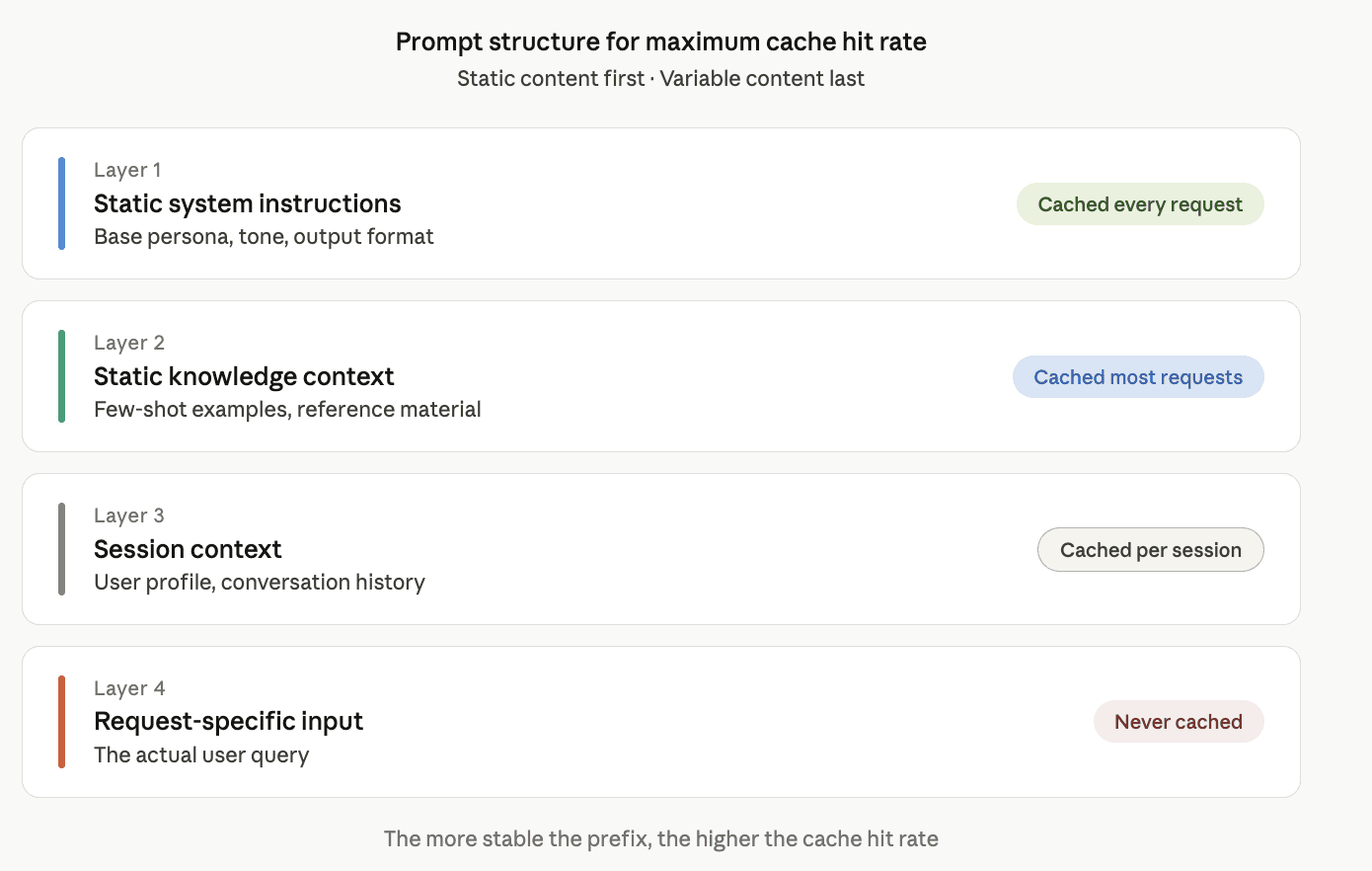
A common mistake is mixing layers 1 and 3. For example, injecting the user's first name into the system prompt. This ensures the cache never hits on layer 1, even though the underlying instructions are identical across every request. Move user context to layer 3 and leave layer 1 completely static.
The Multi-Provider Prompt Caching Problem and How to Solve It
Single-provider caching is manageable once prompt structure is correct. Multi-provider caching is where things get significantly more complicated.
The root problem is that each provider's cache is independent. There is no cache synchronization between OpenAI, Anthropic, and Google. When your routing layer sends a request to a different provider for any reason that provider starts cold. None of the previous provider's cache transfers.
Traffic distribution compounds this. If requests are split across three providers, no single provider's cache ever warms up enough to sustain a healthy hit rate. Aggregate hit rates of 5–10% are common in naive multi-provider setups where each provider individually could sustain 35%+ if traffic were concentrated.
The TTL problem makes this worse. If the cache expires after five minutes and your system switches providers between request bursts, you are effectively starting cold on every switch and the TTL clock restarts on the new provider.
What cache-aware routing actually looks like
The correct approach routes to the provider with the warmest cache by default, and accounts for cache warmup cost when a switch is unavoidable — not just current latency or cost-per-token.
This is what Infron handles at the routing layer. Rather than treating all providers as interchangeable, Infron tracks cache state across providers and routes accordingly. When a switch becomes unavoidable, the routing logic factors in the cold-cache cost rather than optimizing on latency alone.
Two specifics worth knowing from Infron's implementation:
TTL extension. For workloads with bursty traffic, heavy during business hours, quiet overnight. Infron supports a 1-hour cache TTL extension. For workloads where the alternative is paying full input price on every first request of each business day, the extension typically pays for itself quickly.
Hit rate visibility. Infron's dashboard surfaces per-API-key cache hit rate trends in real time. A degradation from a prompt structure change, a provider routing shift, or a TTL expiry pattern shows up immediately rather than at billing time, after the damage is done.
How to Audit Your Prompt Cache Performance in Under an Hour
If you are not sure how your cache is performing, here is how to find out quickly.
Step 1: Check if caching is active. Look at your API responses for a cached_tokens field in the usage object. If it is always zero, caching either is not enabled or is not hitting.
Step 2: Send the same request twice in quick succession. The second request should show nonzero cached tokens. If it does not, something in your prompt assembly is changing between requests — add logging to capture the exact token sequence being sent.
Step 3: Measure your actual hit rate over 100 requests. Track cached tokens divided by total input tokens across a representative sample of production traffic. Anything below 20% on a workload with repetitive system prompts suggests a structural issue in prompt assembly.
Step 4: Check provider switching frequency. If you are using multi-provider routing, log which provider each request goes to. A hit rate that is healthy per-provider but low in aggregate is a routing problem, not a prompt structure problem.
Most teams who do this audit find at least one fixable issue. The fixes are almost always structural, prompt assembly order, static versus dynamic content separation, routing logic not fundamental to the workload itself.
What Poor Prompt Caching Is Actually Costing You
Prompt caching is not a niche optimization for high-volume applications. Any workload with a system prompt longer than 1,000 tokens and more than a few thousand requests per day will see meaningful cost reduction from getting this right.
The teams that miss it are not ignoring it. They are just not seeing the signal because a 0% cache hit rate looks identical to "caching does not apply to my use case" until you inspect the prompt assembly and realize you have been injecting a timestamp at line 2 of the system prompt for the past six months.
Check your prompts. Run the audit. The savings are almost certainly already there.
Infron supports prompt caching across OpenAI, Anthropic, Google Gemini, Grok, DeepSeek, and other major providers — with cache-aware multi-provider routing, 1-hour TTL extension, and per-API-key cache hit rate monitoring in the dashboard. See the full provider setup guide at infron.ai/docs/features/prompt-caching. Get started at infron.ai.
FAQ
Does prompt caching work automatically, or do I need to configure it?
It depends on the provider. OpenAI, Google Gemini, Grok, and DeepSeek support implicit caching, no configuration needed. Anthropic Claude requires explicit cache_control breakpoints in your request. See the Infron prompt caching setup guide for provider-specific instructions.
How much does a cache read actually cost?
Most providers charge 10% of the standard input price for cached tokens, a 90% discount. Cache writes cost slightly more than a standard input token, but the savings on reads make the math strongly positive for any high-frequency workload.
Why is my cache hit rate low even though I enabled caching?
The most common causes are prompt assembly order (dynamic content injected at the start of the system prompt), whitespace or formatting inconsistencies between requests, and provider switching in multi-provider routing setups. The audit steps above will identify which one applies to your workload.