One API. 300+ models. No provider lock-in.
Best OpenClaw Model Providers 2026: Infron as Your Unified API Layer
If you have been following the rise of self-hosted AI assistants, you have probably come across OpenClaw. It is not just another chatbot UI. OpenClaw is officially positioned as a personal AI assistant you run on your own devices, and it is built to work through the channels you already use, including WhatsApp, Telegram, Slack, Discord, Google Chat, Signal, iMessage, Microsoft Teams, LINE, WeChat, and more. Its Gateway acts as the control plane, while the assistant itself is the real product experience.
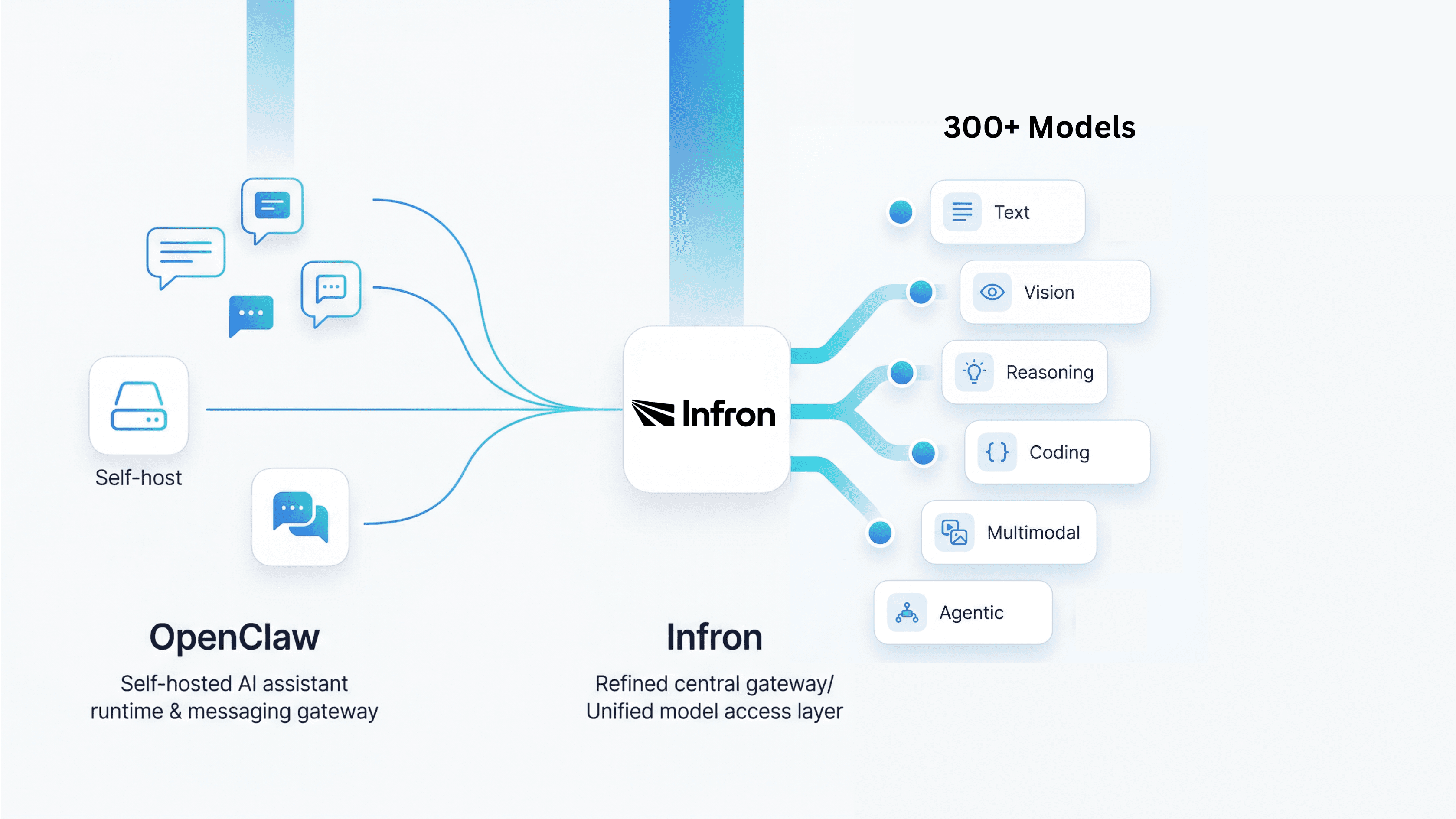
That positioning matters because once an AI assistant starts handling real conversations, notifications, workflows, and automation, the most important question is no longer just “which prompt should I use?” It becomes “how should I manage models, providers, fallback logic, and future changes in the model layer?” This is exactly where pairing OpenClaw with Infron becomes interesting. OpenClaw gives you the runtime, channels, and agent experience; Infron gives you a unified model access layer through a single API and a large model catalog.
What Is OpenClaw?
According to the official README, OpenClaw is a local-first personal AI assistant that runs on your own infrastructure and answers you through the messaging apps you already use. It supports voice capabilities on macOS, iOS, and Android, multi-agent routing, a live Canvas workspace, and built-in tools such as browser actions, cron, sessions, and platform actions for environments like Slack and Discord. In other words, OpenClaw is not designed as a single chat box — it is designed as an AI assistant runtime.
The OpenClaw team also describes the product as an “open agent platform” that runs on your machine and follows you across chat apps. Their emphasis is clear: your assistant, your machine, your rules. That makes OpenClaw particularly relevant for users who care about control, self-hosting, channel flexibility, and keeping the assistant layer close to their own infrastructure rather than outsourcing everything to a SaaS wrapper.
Why Your Model Choice Will Make or Break Your OpenClaw Deployment
A lot of OpenClaw tutorials focus on installation, onboarding, or channel setup. Those are important, but they are not the long-term bottleneck. The model layer is. Once an assistant becomes part of a real workflow, you need to decide which model should be the default, which models should be used as fallbacks, how you handle auth failures, and how to swap models without breaking the rest of the system. OpenClaw’s official model docs show that this is already built into the architecture: it uses a primary model first, then ordered fallbacks, and it can perform provider-level auth failover before moving to the next model in the chain.
This is a much more mature design than hardcoding a single provider and a single model forever. OpenClaw also supports model switching through chat commands like /model, /model list, and /model status, as well as CLI commands such as openclaw models list, openclaw models status, and openclaw models set. That means model selection is treated as an operational concern, not a one-time installation detail.
How OpenClaw Handles Model Providers
OpenClaw’s provider architecture is one of the strongest reasons it is worth taking seriously as a framework rather than just as a trend. The official docs explain that provider plugins can inject catalogs via registerProvider({ catalog }), and OpenClaw merges those into models.providers before writing models.json. It also supports hooks such as resolveDynamicModel and prepareDynamicModel, which means the framework is designed to accommodate models that may not exist in a static local catalog at first.
That is a critical design decision. It means OpenClaw does not think of models as a single hardcoded dependency. Instead, it treats providers and model catalogs as infrastructure that can be normalized, extended, and managed over time. For anyone building a serious self-hosted AI assistant, that is exactly the right abstraction layer.
What the Current Official Infron Guide Actually Supports
Here is the most important verification note for accuracy: the current official [Infron OpenClaw integration guide] shows a configuration-based integration, not an automatic live sync from Infron’s public models page. The documented flow is to create an Infron account, get an API key, point OpenClaw at Infron’s OpenAI-compatible base URL, and then manually declare the models you want inside ~/.openclaw/openclaw.json.
So if you are writing about this integration for a company website, the accurate wording is: today, OpenClaw users can use Infron as a custom provider by explicitly listing chosen models in configuration. It would be inaccurate to say that the current official setup already supports automatic OpenClaw discovery from infron.ai/models. What is true is that OpenClaw’s provider architecture is clearly future-ready for richer catalog-driven integrations.
Why Infron Is the Best Model Provider for OpenClaw
The first reason is compatibility. Infron officially provides OpenAI-compatible API endpoints and states that you can keep using familiar OpenAI client libraries by changing the base URL and API key. For OpenClaw users, that makes integration far easier because Infron can sit behind a familiar API shape instead of requiring a completely different model access pattern.
The second reason is breadth. Infron describes itself as a single API that connects developers to thousands of open-source models, commercial models, and search agents. Its model marketplace is presented as a place to compare 500+ LLM APIs, which immediately expands the strategic options for OpenClaw users who do not want to be locked into a single provider stack.
The third reason is fit for agent workloads. Infron’s model catalog explicitly includes models described as useful for agentic workflows and OpenClaw-like scenarios, including GLM 5 Turbo, Gemini 3 Flash Preview, Claude Opus 4.5, GPT 5 Codex, and Xiaomi Mimo variants. That is a meaningful advantage, because choosing models for an assistant runtime is not just about “best benchmark score” — it is about latency, cost, multimodality, reasoning style, coding ability, and suitability for tool-heavy workflows.
The fourth reason is control. Infron offers BYOK (Bring Your Own Key), which allows users to use their own provider credentials without added markup, according to Infron’s official BYOK documentation. That can matter for OpenClaw users who want unified routing and integration convenience without giving up direct commercial relationships, provider credits, or access to private cloud-linked model accounts.
What the Integration Looks Like in Practice
At a high level, the official setup is straightforward. You install OpenClaw, create an Infron account, get an API key, and add an infron provider block to your OpenClaw configuration. In the official example, the base URL is https://llm.onerouter.pro/v1, the API type is openai-completions, and the selected models are listed in the provider’s models array. You then set a default model under agents.defaults.model.primary and verify it with commands like openclaw models list or openclaw models set.
The official Infron guide includes example models such as DeepSeek, GPT-5.2, Gemini 3 Pro Preview, and Claude Sonnet 4.5. The more important takeaway, though, is not any one model name. It is the architectural shift: OpenClaw stops being tied to a single default provider, and starts operating with a more flexible model access layer underneath it.
Here is the smallest useful concept snippet for readers who want to understand the shape of the integration:
{
  "models": {
    "mode": "merge",
    "providers": {
      "infron": {
        "baseUrl": "https://llm.onerouter.pro/v1",
        "apiKey": "<API_KEY>",
        "api": "openai-completions"
      }
    }
  }
}
{
  "models": {
    "mode": "merge",
    "providers": {
      "infron": {
        "baseUrl": "https://llm.onerouter.pro/v1",
        "apiKey": "<API_KEY>",
        "api": "openai-completions"
      }
    }
  }
}
For the full working configuration, readers should follow the latest official Infron guide rather than relying on a blog post copy, because model availability and example configurations can change over time.
Why This Is More Than “More Models”
It would be easy to reduce this story to a simple headline like “OpenClaw now has access to more models.” That is true, but it undersells the real value. The deeper benefit is that OpenClaw becomes easier to operate as a long-lived system. When cost changes, when a model degrades, when you need a stronger coding model, when a multimodal model becomes necessary, or when you want separate model strategies for different agents, you can evolve the model layer without redesigning the assistant layer.
That matters because OpenClaw’s real strength is not that it can call one model through one API. Its strength is that it can sit between channels, tools, sessions, and workflows. Infron complements that by making the underlying model access strategy broader and more adaptable.
Best-Fit Use Cases for OpenClaw + Infron
If your OpenClaw deployment handles day-to-day messaging through WhatsApp, Telegram, Slack, or Discord, you may want a default model that is fast and cost-efficient. If you also use the assistant for longer-horizon reasoning, coding tasks, multimodal analysis, or more complex workflows, you may want stronger fallback models. OpenClaw’s primary-plus-fallback design and Infron’s broad model access are a natural fit for exactly that kind of layered strategy.
This also makes the combination attractive for teams, not just individuals. Once OpenClaw moves beyond experimentation, model strategy becomes a shared operational concern. Using Infron as the provider layer can make that strategy easier to standardize, document, and evolve across environments.
Conclusion: Build on OpenClaw. Scale with Infron.
OpenClaw is compelling because it brings AI assistants into real-world channels and real-world workflows. But long-term usefulness depends on more than channel support. It depends on how flexibly you can manage the model layer underneath. Infron solves that directly: one OpenAI-compatible API, 300+ models, built-in fallback routing, and no vendor lock-in. If the goal is not just to make OpenClaw run but to make it last, Infron is where serious teams start.
Start building with Infron today.
FAQ
Can I use Infron with OpenClaw right now?
Yes. Infron has an official OpenClaw integration guide. You add Infron as a custom provider in your openclaw.json, point it at Infron's OpenAI-compatible base URL, and use your Infron API key. The setup takes a few minutes.
Does the current official guide support automatic model discovery from Infron’s models catalog?
Not in the way many people might assume. The current official guide shows manual model declaration in openclaw.json. It does not yet document an automatic live import of all models from the Infron models page.
When does adding Infron actually make a difference?
When your workload diversifies. A single model works fine early on. Once you need faster models for chat, stronger models for reasoning, and cheaper models for automation, managing that through one API surface is significantly easier than juggling multiple provider integrations.
What is the biggest advantage of using Infron with OpenClaw?
The biggest advantage is flexibility. OpenClaw remains your self-hosted assistant runtime, while Infron gives you a broader, more manageable, and more future-proof way to access models through a single API surface.
If you have been following the rise of self-hosted AI assistants, you have probably come across OpenClaw. It is not just another chatbot UI. OpenClaw is officially positioned as a personal AI assistant you run on your own devices, and it is built to work through the channels you already use, including WhatsApp, Telegram, Slack, Discord, Google Chat, Signal, iMessage, Microsoft Teams, LINE, WeChat, and more. Its Gateway acts as the control plane, while the assistant itself is the real product experience.
That positioning matters because once an AI assistant starts handling real conversations, notifications, workflows, and automation, the most important question is no longer just “which prompt should I use?” It becomes “how should I manage models, providers, fallback logic, and future changes in the model layer?” This is exactly where pairing OpenClaw with Infron becomes interesting. OpenClaw gives you the runtime, channels, and agent experience; Infron gives you a unified model access layer through a single API and a large model catalog.
What Is OpenClaw?
According to the official README, OpenClaw is a local-first personal AI assistant that runs on your own infrastructure and answers you through the messaging apps you already use. It supports voice capabilities on macOS, iOS, and Android, multi-agent routing, a live Canvas workspace, and built-in tools such as browser actions, cron, sessions, and platform actions for environments like Slack and Discord. In other words, OpenClaw is not designed as a single chat box — it is designed as an AI assistant runtime.
The OpenClaw team also describes the product as an “open agent platform” that runs on your machine and follows you across chat apps. Their emphasis is clear: your assistant, your machine, your rules. That makes OpenClaw particularly relevant for users who care about control, self-hosting, channel flexibility, and keeping the assistant layer close to their own infrastructure rather than outsourcing everything to a SaaS wrapper.
Why Your Model Choice Will Make or Break Your OpenClaw Deployment
A lot of OpenClaw tutorials focus on installation, onboarding, or channel setup. Those are important, but they are not the long-term bottleneck. The model layer is. Once an assistant becomes part of a real workflow, you need to decide which model should be the default, which models should be used as fallbacks, how you handle auth failures, and how to swap models without breaking the rest of the system. OpenClaw’s official model docs show that this is already built into the architecture: it uses a primary model first, then ordered fallbacks, and it can perform provider-level auth failover before moving to the next model in the chain.
This is a much more mature design than hardcoding a single provider and a single model forever. OpenClaw also supports model switching through chat commands like /model, /model list, and /model status, as well as CLI commands such as openclaw models list, openclaw models status, and openclaw models set. That means model selection is treated as an operational concern, not a one-time installation detail.
How OpenClaw Handles Model Providers
OpenClaw’s provider architecture is one of the strongest reasons it is worth taking seriously as a framework rather than just as a trend. The official docs explain that provider plugins can inject catalogs via registerProvider({ catalog }), and OpenClaw merges those into models.providers before writing models.json. It also supports hooks such as resolveDynamicModel and prepareDynamicModel, which means the framework is designed to accommodate models that may not exist in a static local catalog at first.
That is a critical design decision. It means OpenClaw does not think of models as a single hardcoded dependency. Instead, it treats providers and model catalogs as infrastructure that can be normalized, extended, and managed over time. For anyone building a serious self-hosted AI assistant, that is exactly the right abstraction layer.
What the Current Official Infron Guide Actually Supports
Here is the most important verification note for accuracy: the current official [Infron OpenClaw integration guide] shows a configuration-based integration, not an automatic live sync from Infron’s public models page. The documented flow is to create an Infron account, get an API key, point OpenClaw at Infron’s OpenAI-compatible base URL, and then manually declare the models you want inside ~/.openclaw/openclaw.json.
So if you are writing about this integration for a company website, the accurate wording is: today, OpenClaw users can use Infron as a custom provider by explicitly listing chosen models in configuration. It would be inaccurate to say that the current official setup already supports automatic OpenClaw discovery from infron.ai/models. What is true is that OpenClaw’s provider architecture is clearly future-ready for richer catalog-driven integrations.
Why Infron Is the Best Model Provider for OpenClaw
The first reason is compatibility. Infron officially provides OpenAI-compatible API endpoints and states that you can keep using familiar OpenAI client libraries by changing the base URL and API key. For OpenClaw users, that makes integration far easier because Infron can sit behind a familiar API shape instead of requiring a completely different model access pattern.
The second reason is breadth. Infron describes itself as a single API that connects developers to thousands of open-source models, commercial models, and search agents. Its model marketplace is presented as a place to compare 500+ LLM APIs, which immediately expands the strategic options for OpenClaw users who do not want to be locked into a single provider stack.
The third reason is fit for agent workloads. Infron’s model catalog explicitly includes models described as useful for agentic workflows and OpenClaw-like scenarios, including GLM 5 Turbo, Gemini 3 Flash Preview, Claude Opus 4.5, GPT 5 Codex, and Xiaomi Mimo variants. That is a meaningful advantage, because choosing models for an assistant runtime is not just about “best benchmark score” — it is about latency, cost, multimodality, reasoning style, coding ability, and suitability for tool-heavy workflows.
The fourth reason is control. Infron offers BYOK (Bring Your Own Key), which allows users to use their own provider credentials without added markup, according to Infron’s official BYOK documentation. That can matter for OpenClaw users who want unified routing and integration convenience without giving up direct commercial relationships, provider credits, or access to private cloud-linked model accounts.
What the Integration Looks Like in Practice
At a high level, the official setup is straightforward. You install OpenClaw, create an Infron account, get an API key, and add an infron provider block to your OpenClaw configuration. In the official example, the base URL is https://llm.onerouter.pro/v1, the API type is openai-completions, and the selected models are listed in the provider’s models array. You then set a default model under agents.defaults.model.primary and verify it with commands like openclaw models list or openclaw models set.
The official Infron guide includes example models such as DeepSeek, GPT-5.2, Gemini 3 Pro Preview, and Claude Sonnet 4.5. The more important takeaway, though, is not any one model name. It is the architectural shift: OpenClaw stops being tied to a single default provider, and starts operating with a more flexible model access layer underneath it.
Here is the smallest useful concept snippet for readers who want to understand the shape of the integration:
{
  "models": {
    "mode": "merge",
    "providers": {
      "infron": {
        "baseUrl": "https://llm.onerouter.pro/v1",
        "apiKey": "<API_KEY>",
        "api": "openai-completions"
      }
    }
  }
}
For the full working configuration, readers should follow the latest official Infron guide rather than relying on a blog post copy, because model availability and example configurations can change over time.
Why This Is More Than “More Models”
It would be easy to reduce this story to a simple headline like “OpenClaw now has access to more models.” That is true, but it undersells the real value. The deeper benefit is that OpenClaw becomes easier to operate as a long-lived system. When cost changes, when a model degrades, when you need a stronger coding model, when a multimodal model becomes necessary, or when you want separate model strategies for different agents, you can evolve the model layer without redesigning the assistant layer.
That matters because OpenClaw’s real strength is not that it can call one model through one API. Its strength is that it can sit between channels, tools, sessions, and workflows. Infron complements that by making the underlying model access strategy broader and more adaptable.
Best-Fit Use Cases for OpenClaw + Infron
If your OpenClaw deployment handles day-to-day messaging through WhatsApp, Telegram, Slack, or Discord, you may want a default model that is fast and cost-efficient. If you also use the assistant for longer-horizon reasoning, coding tasks, multimodal analysis, or more complex workflows, you may want stronger fallback models. OpenClaw’s primary-plus-fallback design and Infron’s broad model access are a natural fit for exactly that kind of layered strategy.
This also makes the combination attractive for teams, not just individuals. Once OpenClaw moves beyond experimentation, model strategy becomes a shared operational concern. Using Infron as the provider layer can make that strategy easier to standardize, document, and evolve across environments.
Conclusion: Build on OpenClaw. Scale with Infron.
OpenClaw is compelling because it brings AI assistants into real-world channels and real-world workflows. But long-term usefulness depends on more than channel support. It depends on how flexibly you can manage the model layer underneath. Infron solves that directly: one OpenAI-compatible API, 300+ models, built-in fallback routing, and no vendor lock-in. If the goal is not just to make OpenClaw run but to make it last, Infron is where serious teams start.
Start building with Infron today.
FAQ
Can I use Infron with OpenClaw right now?
Yes. Infron has an official OpenClaw integration guide. You add Infron as a custom provider in your openclaw.json, point it at Infron's OpenAI-compatible base URL, and use your Infron API key. The setup takes a few minutes.
Does the current official guide support automatic model discovery from Infron’s models catalog?
Not in the way many people might assume. The current official guide shows manual model declaration in openclaw.json. It does not yet document an automatic live import of all models from the Infron models page.
When does adding Infron actually make a difference?
When your workload diversifies. A single model works fine early on. Once you need faster models for chat, stronger models for reasoning, and cheaper models for automation, managing that through one API surface is significantly easier than juggling multiple provider integrations.
What is the biggest advantage of using Infron with OpenClaw?
The biggest advantage is flexibility. OpenClaw remains your self-hosted assistant runtime, while Infron gives you a broader, more manageable, and more future-proof way to access models through a single API surface.
More Articles
Agentic payments
From HTTP Requests to Machine Transactions: A Deep Dive into Cloudflare Monetization Gateway and x402
Agentic payments
From HTTP Requests to Machine Transactions: A Deep Dive into Cloudflare Monetization Gateway and x402

A joint whitepaper proposing an operational and financial framework for managing enterprise AI inference transactions
From API Request to General Ledger
A joint whitepaper proposing an operational and financial framework for managing enterprise AI inference transactions
From API Request to General Ledger
Inference execution modes
From Sync APIs to Task-Based Inference: Priority, Standard, Flex, Async, and Batch
Inference execution modes