Infron Explained · 01. What happens when an LLM request fails?
Retries and provider fallback, explained

Infron Explained · 01
Your application sends a request to a language model. The provider cannot complete it. Should the gateway try another provider, or should your application send the request again?
Both can be useful, but they happen at different levels. Provider fallback lets the gateway try another eligible provider within the request. An application retry sends a new request to the gateway.
In this first Infron Explained guide, we walk through the difference, the settings that control provider routing, and the checks to make before retrying. The goal is a recovery policy that gives the request another chance without letting the user wait indefinitely.
Infron’s Inference Provider Routing documentation is the configuration reference for this guide: Inference Provider Routing documentation
1. Two ways to recover from a failed request
Imagine two eligible providers serving the same model. If the first cannot serve the request, the gateway may try the second according to its routing policy. Your application still sees this as one request to Infron.
If that request fails and your application sends it again, that is an application retry. The new request goes through provider routing again. A new application request therefore does not necessarily mean a single provider attempt.
The documented routing controls are:
order: preferred provider sequence.
only: the permitted provider set.
allow_fallbacks: enabled by default. The documentation’s ordered-provider example says setting it to false stops expansion beyond the ordered list; it still shows the second listed provider being tried after the first fails.
preferred_max_latency: a routing preference. Providers outside the threshold are deprioritized, not excluded. It is not an application deadline.
Do not interpret allow_fallbacks=false as a guarantee of one upstream attempt. Use the only field to restrict the permitted provider set. These settings do not specify an internal attempt limit.
Source: Inference Provider Routing documentation
2. Choose which providers may handle the request
First, copy the exact provider slug, the identifier used in API requests, from the selected model’s provider list. The official documentation shows the copy control beside the provider name.
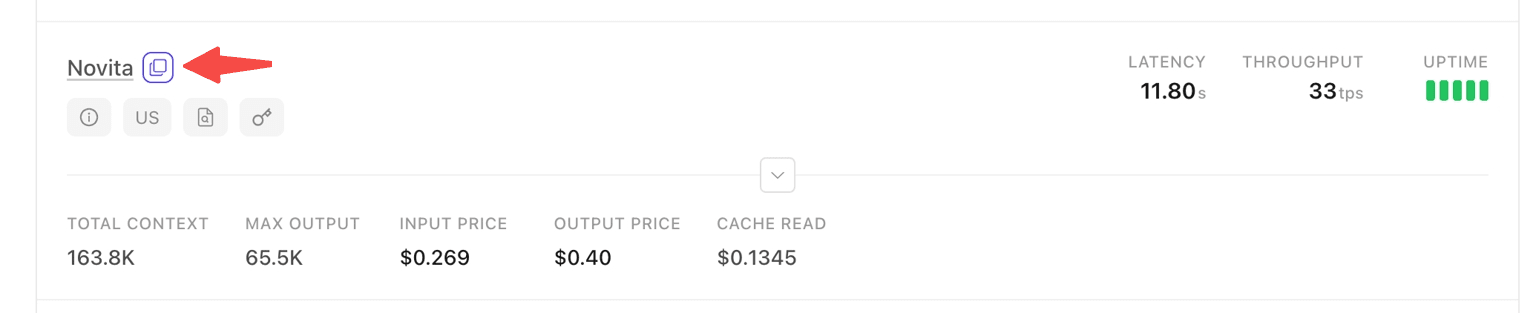
Copy the provider slug beside the provider name. Source: Infron documentation. Values shown in this documentation screenshot are illustrative, not current pricing or performance. Inference Provider Routing documentation
For a workload with two approved providers, express both the desired order and the allowed set. This is an illustrative provider object, not a ready-to-send request; replace both placeholders with supported provider slugs for the selected model.
{
  "provider": {
    "order": ["<preferred-provider>", "<approved-backup>"],
    "only": ["<preferred-provider>", "<approved-backup>"],
    "allow_fallbacks": true
  }
}
{
  "provider": {
    "order": ["<preferred-provider>", "<approved-backup>"],
    "only": ["<preferred-provider>", "<approved-backup>"],
    "allow_fallbacks": true
  }
}
Before deployment, test the complete request with your chosen model, parameters, and account. Confirm that both providers are available for that configuration; fallback behavior also depends on the failure encountered.
3. Check whether your SDK already retries
Check the client library before adding a retry loop. The OpenAI Python SDK documents two automatic retries for certain connection and HTTP errors, and supports max_retries=0 to disable them. That is SDK behavior, not an Infron retry guarantee.
If your application owns the retry decision, disable SDK retries so the application controls when each new request starts. For example, two application attempts combined with three SDK attempts per call could produce up to six outgoing requests when each encounters an eligible error. This hypothetical example counts requests to Infron, not provider attempts inside the gateway.
Source: OpenAI Python SDK retry documentation
4. Give the whole task one deadline
Start the task deadline before preprocessing, using a monotonic clock so system clock adjustments do not change elapsed time. Include model requests, waits between attempts, validation, and delivery. A network timeout may cover only part of that work.
Our suggested policy for an interactive, read-only generation task is:
Set a maximum number of application attempts separately from the deadline.
Before every attempt, subtract elapsed time and reserve time for validation and delivery.
Start another attempt only if enough time remains to generate a useful response.
Include backoff, the wait before retrying, in the same budget. Stop if that wait leaves too little time for another attempt.
On deadline expiry, stop waiting and request cancellation where supported. Do not treat local cancellation as proof that upstream work or billing stopped.
Suppose a task has a 12-second budget and reserves one second for finishing. If the first call and intervening work consume eight seconds, the next call gets at most three seconds. It does not receive a fresh 12 seconds. These numbers illustrate budget accounting, not Infron performance.
5. Decide whether another request is safe
Check the response content as well as the HTTP status. Infron’s error documentation says generation failures can appear in the response body or an SSE event after HTTP 200. Inspect the response and validate completion before declaring success.
Source: Infron error documentation
Define a recovery policy for the failure you actually observed. Correct invalid requests or account problems before resending. For a transient failure, consider another attempt only within the remaining budget. Avoid a catch-all loop that resends every exception.
If streaming output has reached the user, decide explicitly whether a fresh generation should replace it, appear as a new attempt, or require user action. Do not silently append a restarted answer to an incomplete one.
If a generated tool call can send a message, place an order, or change data, check whether that action already completed before replaying the workflow. Repeating generation and repeating a business action require different safeguards.
For general retry design, including backoff and side effects, see AWS retry design guidance
6. Check what happened in the logs
Record a task identifier, the application attempt number, elapsed time, remaining budget, routing policy, and observed outcome. Store request identifiers when available. Use gateway traces, when available, to distinguish provider activity from application resends; do not infer a fallback chain from latency alone.
Test a successful response, an explicit error, a timeout, an interrupted stream, and an exhausted task budget. Confirm that your application starts no new attempt after the deadline and never repeats an external action without checking its outcome.
The public documentation does not provide a complete list of fallback triggers, an internal attempt limit, or a guarantee of switching providers after streaming starts. Validate any behavior your application depends on before deployment.
A clear routing policy, a bounded application retry policy, and request-level logs make recovery easier to operate. Keep all attempts within the same task deadline.
Configure your integration
Open the Infron Inference Provider Routing documentation for the complete provider configuration reference: Inference Provider Routing documentation
Q&A
Q: Does provider fallback replace application retries?
A: Provider fallback operates within a request. Your application decides whether to send a new request after a failure. Configure both policies and keep application attempts within one task deadline.
Q: Does allow_fallbacks=false guarantee a single provider attempt?
A: No. The documentation’s ordered-provider example still tries the next provider in order. Do not use this flag as an attempt counter; use the only field to define the permitted provider set.
Q: Is preferred_max_latency a hard timeout?
A: No. It changes provider preference. Your application must enforce its own task deadline.
Q: Should I retry after receiving part of a streamed answer?
A: Treat a restarted generation as a new attempt. Decide how partial output is handled, and check whether any tool actions already completed before replaying the workflow. This guide does not claim that Infron resumes an interrupted stream on another provider.
Q: Where do I configure provider routing?
A: Start with the official Inference Provider Routing documentation: Inference Provider Routing documentation
Infron Explained · 01
Your application sends a request to a language model. The provider cannot complete it. Should the gateway try another provider, or should your application send the request again?
Both can be useful, but they happen at different levels. Provider fallback lets the gateway try another eligible provider within the request. An application retry sends a new request to the gateway.
In this first Infron Explained guide, we walk through the difference, the settings that control provider routing, and the checks to make before retrying. The goal is a recovery policy that gives the request another chance without letting the user wait indefinitely.
Infron’s Inference Provider Routing documentation is the configuration reference for this guide: Inference Provider Routing documentation
1. Two ways to recover from a failed request
Imagine two eligible providers serving the same model. If the first cannot serve the request, the gateway may try the second according to its routing policy. Your application still sees this as one request to Infron.
If that request fails and your application sends it again, that is an application retry. The new request goes through provider routing again. A new application request therefore does not necessarily mean a single provider attempt.
The documented routing controls are:
order: preferred provider sequence.
only: the permitted provider set.
allow_fallbacks: enabled by default. The documentation’s ordered-provider example says setting it to false stops expansion beyond the ordered list; it still shows the second listed provider being tried after the first fails.
preferred_max_latency: a routing preference. Providers outside the threshold are deprioritized, not excluded. It is not an application deadline.
Do not interpret allow_fallbacks=false as a guarantee of one upstream attempt. Use the only field to restrict the permitted provider set. These settings do not specify an internal attempt limit.
Source: Inference Provider Routing documentation
2. Choose which providers may handle the request
First, copy the exact provider slug, the identifier used in API requests, from the selected model’s provider list. The official documentation shows the copy control beside the provider name.
Copy the provider slug beside the provider name. Source: Infron documentation. Values shown in this documentation screenshot are illustrative, not current pricing or performance. Inference Provider Routing documentation
For a workload with two approved providers, express both the desired order and the allowed set. This is an illustrative provider object, not a ready-to-send request; replace both placeholders with supported provider slugs for the selected model.
{
  "provider": {
    "order": ["<preferred-provider>", "<approved-backup>"],
    "only": ["<preferred-provider>", "<approved-backup>"],
    "allow_fallbacks": true
  }
}
Before deployment, test the complete request with your chosen model, parameters, and account. Confirm that both providers are available for that configuration; fallback behavior also depends on the failure encountered.
3. Check whether your SDK already retries
Check the client library before adding a retry loop. The OpenAI Python SDK documents two automatic retries for certain connection and HTTP errors, and supports max_retries=0 to disable them. That is SDK behavior, not an Infron retry guarantee.
If your application owns the retry decision, disable SDK retries so the application controls when each new request starts. For example, two application attempts combined with three SDK attempts per call could produce up to six outgoing requests when each encounters an eligible error. This hypothetical example counts requests to Infron, not provider attempts inside the gateway.
Source: OpenAI Python SDK retry documentation
4. Give the whole task one deadline
Start the task deadline before preprocessing, using a monotonic clock so system clock adjustments do not change elapsed time. Include model requests, waits between attempts, validation, and delivery. A network timeout may cover only part of that work.
Our suggested policy for an interactive, read-only generation task is:
Set a maximum number of application attempts separately from the deadline.
Before every attempt, subtract elapsed time and reserve time for validation and delivery.
Start another attempt only if enough time remains to generate a useful response.
Include backoff, the wait before retrying, in the same budget. Stop if that wait leaves too little time for another attempt.
On deadline expiry, stop waiting and request cancellation where supported. Do not treat local cancellation as proof that upstream work or billing stopped.
Suppose a task has a 12-second budget and reserves one second for finishing. If the first call and intervening work consume eight seconds, the next call gets at most three seconds. It does not receive a fresh 12 seconds. These numbers illustrate budget accounting, not Infron performance.
5. Decide whether another request is safe
Check the response content as well as the HTTP status. Infron’s error documentation says generation failures can appear in the response body or an SSE event after HTTP 200. Inspect the response and validate completion before declaring success.
Source: Infron error documentation
Define a recovery policy for the failure you actually observed. Correct invalid requests or account problems before resending. For a transient failure, consider another attempt only within the remaining budget. Avoid a catch-all loop that resends every exception.
If streaming output has reached the user, decide explicitly whether a fresh generation should replace it, appear as a new attempt, or require user action. Do not silently append a restarted answer to an incomplete one.
If a generated tool call can send a message, place an order, or change data, check whether that action already completed before replaying the workflow. Repeating generation and repeating a business action require different safeguards.
For general retry design, including backoff and side effects, see AWS retry design guidance
6. Check what happened in the logs
Record a task identifier, the application attempt number, elapsed time, remaining budget, routing policy, and observed outcome. Store request identifiers when available. Use gateway traces, when available, to distinguish provider activity from application resends; do not infer a fallback chain from latency alone.
Test a successful response, an explicit error, a timeout, an interrupted stream, and an exhausted task budget. Confirm that your application starts no new attempt after the deadline and never repeats an external action without checking its outcome.
The public documentation does not provide a complete list of fallback triggers, an internal attempt limit, or a guarantee of switching providers after streaming starts. Validate any behavior your application depends on before deployment.
A clear routing policy, a bounded application retry policy, and request-level logs make recovery easier to operate. Keep all attempts within the same task deadline.
Configure your integration
Open the Infron Inference Provider Routing documentation for the complete provider configuration reference: Inference Provider Routing documentation
Q&A
Q: Does provider fallback replace application retries?
A: Provider fallback operates within a request. Your application decides whether to send a new request after a failure. Configure both policies and keep application attempts within one task deadline.
Q: Does allow_fallbacks=false guarantee a single provider attempt?
A: No. The documentation’s ordered-provider example still tries the next provider in order. Do not use this flag as an attempt counter; use the only field to define the permitted provider set.
Q: Is preferred_max_latency a hard timeout?
A: No. It changes provider preference. Your application must enforce its own task deadline.
Q: Should I retry after receiving part of a streamed answer?
A: Treat a restarted generation as a new attempt. Decide how partial output is handled, and check whether any tool actions already completed before replaying the workflow. This guide does not claim that Infron resumes an interrupted stream on another provider.
Q: Where do I configure provider routing?
A: Start with the official Inference Provider Routing documentation: Inference Provider Routing documentation
More Articles

Highlights from an evening on agent runtimes, model deployment, inference orchestration, memory, and open-source post-training.
Inside Open Infra Night: Building the Infrastructure Behind AI Agents
Highlights from an evening on agent runtimes, model deployment, inference orchestration, memory, and open-source post-training.
Inside Open Infra Night: Building the Infrastructure Behind AI Agents

On-board language model inference, served over Wi-Fi.
Infron open-sources ESP32 LLM Service
On-board language model inference, served over Wi-Fi.
Infron open-sources ESP32 LLM Service

Physical-device automation with Codex, Xcode and XCTest.
Infron Open-Sources iPhone Use with Codex
Physical-device automation with Codex, Xcode and XCTest.