Seedance 2.0 Real Human Pipeline
How to Build a Seedance 2.0 Real Human Pipeline With Reference Images
Most real human video does not come out of a single prompt. A believable real-person clip is the end of a short chain: you start with a reference image, lock the identities in it, then generate motion and audio around them. That lock is the point. Real faces are unforgiving, so the moment a face drifts between frames the clip reads as fake. Skip a step and that is exactly what happens.
This pipeline uses two models on Infron: [Nano Banana Pro] to generate the reference scene, and [Seedance 2.0 virtual portrait] to turn it into a real human video, both on the same key.
To make this concrete, we will build one example end to end: a cafe scene, starting from a single reference image and finishing as a 15-second continuous-camera clip that glides through the room past lifelike, photorealistic people, the kind of attention-grabbing shot that works for social media.
This piece is about the workflow around that call: where the reference comes from, how to keep the people consistent, and how to run the whole chain without juggling vendors.
Why real human video needs a pipeline, not a single call
The hard part of real-person video is not the motion. It is keeping every face the same from the first frame to the last. That consistency, what the model calls the identity lock, is decided before generation even starts, by the quality of the reference and how the identities are locked onto it.
A real human pipeline has three jobs, and each one feeds the next:
Stage | What it decides | Where it can go wrong |
|---|---|---|
Reference image | Who is in the scene, how the faces read | A soft, off-angle, or low-resolution reference drifts during generation |
Identity lock | Whether the model holds those faces | Passing a raw URL fails privacy detection, so the lock never happens |
Generation | Motion, expression, lip sync, audio | A prompt that re-describes the face fights the lock instead of helping |
Treating these as one blurry step is why a lot of real-person output looks off. Treating them as a pipeline, where each stage has a clear input and output, is what makes the result hold together.
The real human pipeline, end to end
Here is the full chain on Infron, using our cafe example. Each step hands its output to the next.
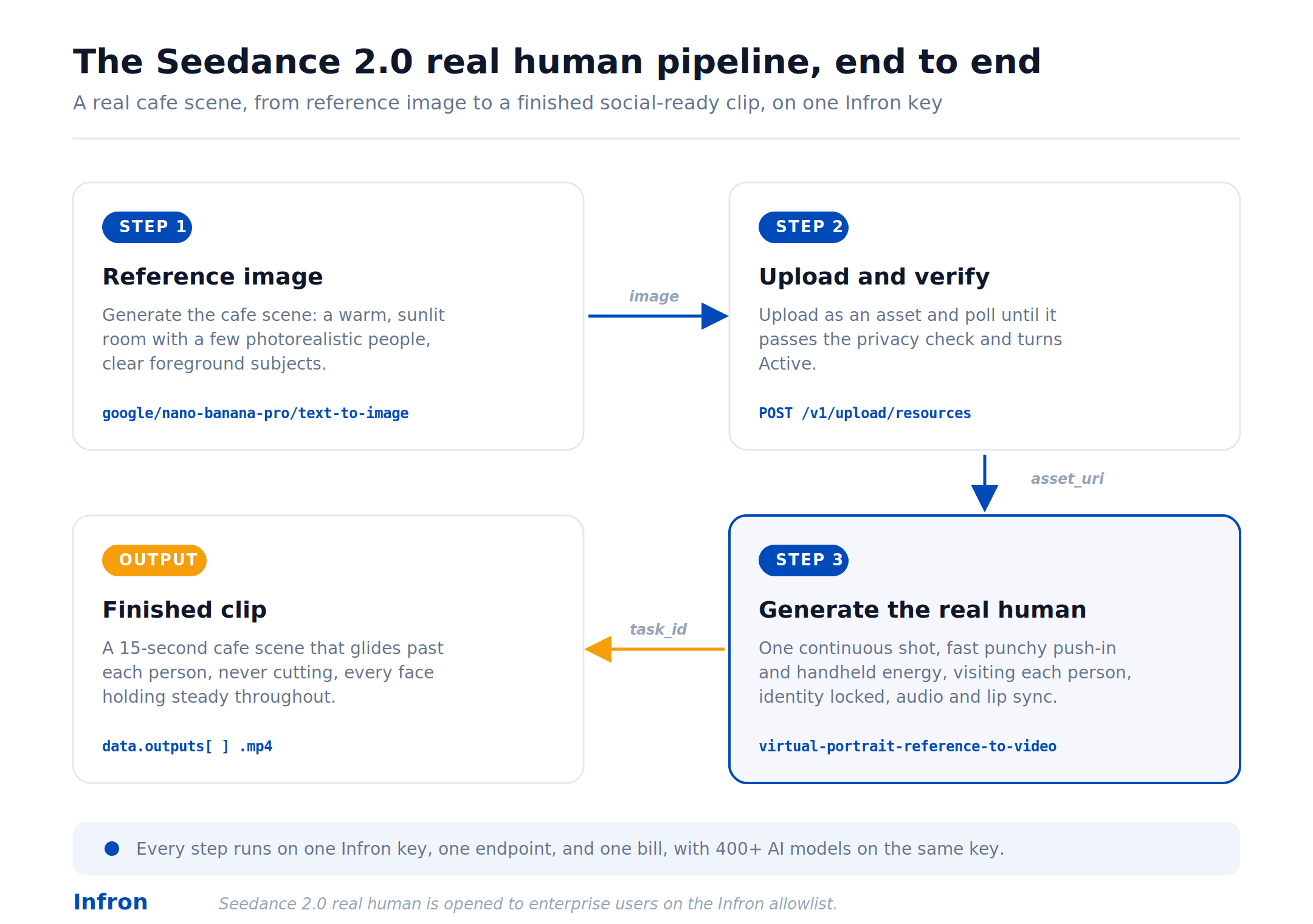
The three steps below follow the same cafe scene from a reference image through to the finished clip.
Step 1: Prepare the reference image
The reference is the single most important input in the pipeline. Everything downstream inherits its quality. A good reference is well framed, evenly lit, sharp, and high enough resolution that every face reads clearly.
For the cafe example, we generate the scene we want: a warm, sunlit cafe with a few people going about their morning, someone sketching in the foreground, a barista at the machine, others on their phones and laptops, all in a photorealistic style with clear foreground subjects. You have two ways to get a reference like this. The first is a real photograph, used with the consent of anyone identifiable in it. The second is to generate the scene with an image model, which is what we do here using Nano Banana Pro on the same Infron key, so the people are lifelike but synthetic. Because the image model and Seedance 2.0 share one key, the generated scene flows straight into the next step without a second integration. We will cover the image-generation side of the pipeline in detail in a follow-up post; for now, here is the reference we start from.

Step 2: Upload and pass the privacy check
Real-person reference images cannot be passed as a raw URL. If you try, the request is rejected by privacy detection with an InputImageSensitiveContentDetected.PrivacyInformation error. The image has to be uploaded as an asset first, which runs a consistency check, and then referenced by the asset URI the upload returns.
import time
import requests

BASE = "https://media.onerouter.pro/v1"
HEADERS = {"Authorization": f"Bearer {INFRON_API_KEY}"}
MODEL = "bytedance/seedance-2.0/virtual-portrait-reference-to-video"

def upload_reference(path):
    with open(path, "rb") as f:
        r = requests.post(
            f"{BASE}/upload/resources",
            headers=HEADERS,
            data={"model": MODEL},
            files={"file": f},
        )
    r.raise_for_status()
    body = r.json()["data"]
    return body["id"], body["upstream_asset_uri"]

def wait_until_active(resource_id, timeout=180):
    deadline = time.time() + timeout
    while time.time() < deadline:
        r = requests.get(f"{BASE}/status/resources/{resource_id}", headers=HEADERS)
        r.raise_for_status()
        data = r.json()["data"]
        if data.get("upstream_status") == "Active":
            return True
        time.sleep(2)
    raise TimeoutError("Reference asset did not reach Active state in time")

resource_id, asset_uri = upload_reference("cafe_reference.png")
wait_until_active(resource_id)
import time
import requests

BASE = "https://media.onerouter.pro/v1"
HEADERS = {"Authorization": f"Bearer {INFRON_API_KEY}"}
MODEL = "bytedance/seedance-2.0/virtual-portrait-reference-to-video"

def upload_reference(path):
    with open(path, "rb") as f:
        r = requests.post(
            f"{BASE}/upload/resources",
            headers=HEADERS,
            data={"model": MODEL},
            files={"file": f},
        )
    r.raise_for_status()
    body = r.json()["data"]
    return body["id"], body["upstream_asset_uri"]

def wait_until_active(resource_id, timeout=180):
    deadline = time.time() + timeout
    while time.time() < deadline:
        r = requests.get(f"{BASE}/status/resources/{resource_id}", headers=HEADERS)
        r.raise_for_status()
        data = r.json()["data"]
        if data.get("upstream_status") == "Active":
            return True
        time.sleep(2)
    raise TimeoutError("Reference asset did not reach Active state in time")

resource_id, asset_uri = upload_reference("cafe_reference.png")
wait_until_active(resource_id)
The full breakdown of the upload response and status fields is in the single-call guide. For the pipeline, the one thing to carry forward is asset_uri, which Step 3 needs.
Step 3: Generate the real human video
Pass the asset URI in image_urls. The reference carries the identities, so the prompt is free to describe motion, framing, and performance. For the cafe scene we ask for one continuous camera move that glides through the room and visits each person in turn. The trick for social media is the camera language: instead of slow and smooth, we reach for fast punchy push-in, handheld energy, and motion blur, since footage that is too smooth gets scrolled past in the first two seconds. Generation is asynchronous: submit the job, get a task_id, then poll until it completes.
def submit_generation(asset_uri, prompt):
    payload = {
        "model": MODEL,
        "image_urls": [asset_uri],
        "video_urls": [],
        "audio_urls": [],
        "prompt": prompt,
        "aspect_ratio": "16:9",
        "duration": "15",
        "resolution": "720p",
        "generate_audio": True,
        "n": 1,
        "seed": 123456,
    }
    r = requests.post(f"{BASE}/videos/generations", headers=HEADERS, json=payload)
    r.raise_for_status()
    return r.json()["data"]["task_id"]

def wait_for_video(task_id, timeout=600):
    deadline = time.time() + timeout
    while time.time() < deadline:
        r = requests.get(f"{BASE}/videos/tasks/{task_id}", headers=HEADERS)
        r.raise_for_status()
        data = r.json()["data"]
        if data["status"] == "completed":
            return data["outputs"]
        if data["status"] == "failed":
            raise RuntimeError(data.get("fail_reason", "generation failed"))
        time.sleep(2)
    raise TimeoutError("Video task did not complete in time")

task_id = submit_generation(
    asset_uri,
    "One single continuous unbroken camera shot with fast punchy push-in and "
    "slight handheld energy, gliding through a sunlit cafe and visiting each "
    "person one at a time, natural motion blur, dynamic speed changes, bold "
    "confident camera motion, the people speaking with matching lip sync, warm "
    "natural light, never cutting, never skipping anyone, designed to grab "
    "attention instantly."
)
videos = wait_for_video(task_id)
print(videos)
def submit_generation(asset_uri, prompt):
    payload = {
        "model": MODEL,
        "image_urls": [asset_uri],
        "video_urls": [],
        "audio_urls": [],
        "prompt": prompt,
        "aspect_ratio": "16:9",
        "duration": "15",
        "resolution": "720p",
        "generate_audio": True,
        "n": 1,
        "seed": 123456,
    }
    r = requests.post(f"{BASE}/videos/generations", headers=HEADERS, json=payload)
    r.raise_for_status()
    return r.json()["data"]["task_id"]

def wait_for_video(task_id, timeout=600):
    deadline = time.time() + timeout
    while time.time() < deadline:
        r = requests.get(f"{BASE}/videos/tasks/{task_id}", headers=HEADERS)
        r.raise_for_status()
        data = r.json()["data"]
        if data["status"] == "completed":
            return data["outputs"]
        if data["status"] == "failed":
            raise RuntimeError(data.get("fail_reason", "generation failed"))
        time.sleep(2)
    raise TimeoutError("Video task did not complete in time")

task_id = submit_generation(
    asset_uri,
    "One single continuous unbroken camera shot with fast punchy push-in and "
    "slight handheld energy, gliding through a sunlit cafe and visiting each "
    "person one at a time, natural motion blur, dynamic speed changes, bold "
    "confident camera motion, the people speaking with matching lip sync, warm "
    "natural light, never cutting, never skipping anyone, designed to grab "
    "attention instantly."
)
videos = wait_for_video(task_id)
print(videos)
The outputs array holds the URL to the finished clip. Here is the result for our cafe scene: the same people from the reference, now a 15-second continuous-camera shot that moves through the room with synchronized audio and lip sync.
That is the whole pipeline: one reference in, one identity-locked video out, with the faces holding steady from the reference all the way through to the final frame.
Keeping identity consistent across the pipeline
Consistency is won at the reference stage and protected at the prompt stage. Two habits matter most.
First, give the model a reference it can actually lock onto. A clean, evenly lit, sharp reference holds far better than a dim or cluttered one. In the cafe example, the scene was generated clean and well lit for exactly this reason, so each face is easy for the model to read. If you are generating the reference with an image model rather than using a photo, prompt for a clear, well-lit result rather than a stylized one, since the model has to read the faces precisely.
Second, let the reference do the identity work and let the prompt do the performance work. Once the identities are locked, re-describing the faces in the prompt tends to fight the lock rather than reinforce it. Notice that the cafe prompt above spends its words on the camera move, the lighting, and the action, not on the faces, which are already fixed by the reference. When results vary between runs, generate a few seeds and pick the strongest take rather than over-engineering a single prompt.
One key for the whole pipeline
The reason to run this chain on Infron is that none of the stages need a separate vendor. The reference image model, the upload and privacy check, and the Seedance 2.0 real human generation all sit behind one OpenAI-compatible key, one endpoint, and one bill, with 400+ AI models reachable from the same key.
That matters most at the seam between image and video. In the cafe example, the scene image came out of Nano Banana Pro and went straight into Seedance 2.0 without a second account, a second integration, or a second invoice. The upstream image side of this pipeline, including how to generate strong reference images with GPT Image 2, is the subject of our next guide, which plugs straight into Step 1 here.
FAQ
What is the difference between the Seedance 2.0 real human pipeline and a single API call?
The single call is Step 3 on its own. The pipeline adds where the reference comes from and how to keep identity consistent from the reference image through to the finished video. For the standalone call, see the [single-call guide].
Can I use a real photo as a Seedance 2.0 reference image?
Yes, for authorized use. The image is uploaded as an asset first, which is what passes Seedance 2.0's privacy detection, and real human access is opened to enterprise users on the allowlist so that use stays consented and accountable.
Can I generate the Seedance 2.0 reference image instead of photographing it?
Yes. Image models such as GPT Image 2 and Nano Banana Pro can produce a reference image, and since they run on the same Infron key, the output feeds Step 2 directly.
Does the Seedance 2.0 pipeline handle audio and lip sync?
Yes. With generate_audio set to true, Seedance 2.0 produces synchronized audio, including lip sync, in the same pass as the video.
Do I need enterprise access for Seedance 2.0 real human generation?
Real human generation is opened to enterprise users on the Infron allowlist. Contact Infron to add your organization.
Most real human video does not come out of a single prompt. A believable real-person clip is the end of a short chain: you start with a reference image, lock the identities in it, then generate motion and audio around them. That lock is the point. Real faces are unforgiving, so the moment a face drifts between frames the clip reads as fake. Skip a step and that is exactly what happens.
This pipeline uses two models on Infron: [Nano Banana Pro] to generate the reference scene, and [Seedance 2.0 virtual portrait] to turn it into a real human video, both on the same key.
To make this concrete, we will build one example end to end: a cafe scene, starting from a single reference image and finishing as a 15-second continuous-camera clip that glides through the room past lifelike, photorealistic people, the kind of attention-grabbing shot that works for social media.
This piece is about the workflow around that call: where the reference comes from, how to keep the people consistent, and how to run the whole chain without juggling vendors.
Why real human video needs a pipeline, not a single call
The hard part of real-person video is not the motion. It is keeping every face the same from the first frame to the last. That consistency, what the model calls the identity lock, is decided before generation even starts, by the quality of the reference and how the identities are locked onto it.
A real human pipeline has three jobs, and each one feeds the next:
Stage | What it decides | Where it can go wrong |
|---|---|---|
Reference image | Who is in the scene, how the faces read | A soft, off-angle, or low-resolution reference drifts during generation |
Identity lock | Whether the model holds those faces | Passing a raw URL fails privacy detection, so the lock never happens |
Generation | Motion, expression, lip sync, audio | A prompt that re-describes the face fights the lock instead of helping |
Treating these as one blurry step is why a lot of real-person output looks off. Treating them as a pipeline, where each stage has a clear input and output, is what makes the result hold together.
The real human pipeline, end to end
Here is the full chain on Infron, using our cafe example. Each step hands its output to the next.
The three steps below follow the same cafe scene from a reference image through to the finished clip.
Step 1: Prepare the reference image
The reference is the single most important input in the pipeline. Everything downstream inherits its quality. A good reference is well framed, evenly lit, sharp, and high enough resolution that every face reads clearly.
For the cafe example, we generate the scene we want: a warm, sunlit cafe with a few people going about their morning, someone sketching in the foreground, a barista at the machine, others on their phones and laptops, all in a photorealistic style with clear foreground subjects. You have two ways to get a reference like this. The first is a real photograph, used with the consent of anyone identifiable in it. The second is to generate the scene with an image model, which is what we do here using Nano Banana Pro on the same Infron key, so the people are lifelike but synthetic. Because the image model and Seedance 2.0 share one key, the generated scene flows straight into the next step without a second integration. We will cover the image-generation side of the pipeline in detail in a follow-up post; for now, here is the reference we start from.
Step 2: Upload and pass the privacy check
Real-person reference images cannot be passed as a raw URL. If you try, the request is rejected by privacy detection with an InputImageSensitiveContentDetected.PrivacyInformation error. The image has to be uploaded as an asset first, which runs a consistency check, and then referenced by the asset URI the upload returns.
import time
import requests

BASE = "https://media.onerouter.pro/v1"
HEADERS = {"Authorization": f"Bearer {INFRON_API_KEY}"}
MODEL = "bytedance/seedance-2.0/virtual-portrait-reference-to-video"

def upload_reference(path):
    with open(path, "rb") as f:
        r = requests.post(
            f"{BASE}/upload/resources",
            headers=HEADERS,
            data={"model": MODEL},
            files={"file": f},
        )
    r.raise_for_status()
    body = r.json()["data"]
    return body["id"], body["upstream_asset_uri"]

def wait_until_active(resource_id, timeout=180):
    deadline = time.time() + timeout
    while time.time() < deadline:
        r = requests.get(f"{BASE}/status/resources/{resource_id}", headers=HEADERS)
        r.raise_for_status()
        data = r.json()["data"]
        if data.get("upstream_status") == "Active":
            return True
        time.sleep(2)
    raise TimeoutError("Reference asset did not reach Active state in time")

resource_id, asset_uri = upload_reference("cafe_reference.png")
wait_until_active(resource_id)
The full breakdown of the upload response and status fields is in the single-call guide. For the pipeline, the one thing to carry forward is asset_uri, which Step 3 needs.
Step 3: Generate the real human video
Pass the asset URI in image_urls. The reference carries the identities, so the prompt is free to describe motion, framing, and performance. For the cafe scene we ask for one continuous camera move that glides through the room and visits each person in turn. The trick for social media is the camera language: instead of slow and smooth, we reach for fast punchy push-in, handheld energy, and motion blur, since footage that is too smooth gets scrolled past in the first two seconds. Generation is asynchronous: submit the job, get a task_id, then poll until it completes.
def submit_generation(asset_uri, prompt):
    payload = {
        "model": MODEL,
        "image_urls": [asset_uri],
        "video_urls": [],
        "audio_urls": [],
        "prompt": prompt,
        "aspect_ratio": "16:9",
        "duration": "15",
        "resolution": "720p",
        "generate_audio": True,
        "n": 1,
        "seed": 123456,
    }
    r = requests.post(f"{BASE}/videos/generations", headers=HEADERS, json=payload)
    r.raise_for_status()
    return r.json()["data"]["task_id"]

def wait_for_video(task_id, timeout=600):
    deadline = time.time() + timeout
    while time.time() < deadline:
        r = requests.get(f"{BASE}/videos/tasks/{task_id}", headers=HEADERS)
        r.raise_for_status()
        data = r.json()["data"]
        if data["status"] == "completed":
            return data["outputs"]
        if data["status"] == "failed":
            raise RuntimeError(data.get("fail_reason", "generation failed"))
        time.sleep(2)
    raise TimeoutError("Video task did not complete in time")

task_id = submit_generation(
    asset_uri,
    "One single continuous unbroken camera shot with fast punchy push-in and "
    "slight handheld energy, gliding through a sunlit cafe and visiting each "
    "person one at a time, natural motion blur, dynamic speed changes, bold "
    "confident camera motion, the people speaking with matching lip sync, warm "
    "natural light, never cutting, never skipping anyone, designed to grab "
    "attention instantly."
)
videos = wait_for_video(task_id)
print(videos)
The outputs array holds the URL to the finished clip. Here is the result for our cafe scene: the same people from the reference, now a 15-second continuous-camera shot that moves through the room with synchronized audio and lip sync.
That is the whole pipeline: one reference in, one identity-locked video out, with the faces holding steady from the reference all the way through to the final frame.
Keeping identity consistent across the pipeline
Consistency is won at the reference stage and protected at the prompt stage. Two habits matter most.
First, give the model a reference it can actually lock onto. A clean, evenly lit, sharp reference holds far better than a dim or cluttered one. In the cafe example, the scene was generated clean and well lit for exactly this reason, so each face is easy for the model to read. If you are generating the reference with an image model rather than using a photo, prompt for a clear, well-lit result rather than a stylized one, since the model has to read the faces precisely.
Second, let the reference do the identity work and let the prompt do the performance work. Once the identities are locked, re-describing the faces in the prompt tends to fight the lock rather than reinforce it. Notice that the cafe prompt above spends its words on the camera move, the lighting, and the action, not on the faces, which are already fixed by the reference. When results vary between runs, generate a few seeds and pick the strongest take rather than over-engineering a single prompt.
One key for the whole pipeline
The reason to run this chain on Infron is that none of the stages need a separate vendor. The reference image model, the upload and privacy check, and the Seedance 2.0 real human generation all sit behind one OpenAI-compatible key, one endpoint, and one bill, with 400+ AI models reachable from the same key.
That matters most at the seam between image and video. In the cafe example, the scene image came out of Nano Banana Pro and went straight into Seedance 2.0 without a second account, a second integration, or a second invoice. The upstream image side of this pipeline, including how to generate strong reference images with GPT Image 2, is the subject of our next guide, which plugs straight into Step 1 here.
FAQ
What is the difference between the Seedance 2.0 real human pipeline and a single API call?
The single call is Step 3 on its own. The pipeline adds where the reference comes from and how to keep identity consistent from the reference image through to the finished video. For the standalone call, see the [single-call guide].
Can I use a real photo as a Seedance 2.0 reference image?
Yes, for authorized use. The image is uploaded as an asset first, which is what passes Seedance 2.0's privacy detection, and real human access is opened to enterprise users on the allowlist so that use stays consented and accountable.
Can I generate the Seedance 2.0 reference image instead of photographing it?
Yes. Image models such as GPT Image 2 and Nano Banana Pro can produce a reference image, and since they run on the same Infron key, the output feeds Step 2 directly.
Does the Seedance 2.0 pipeline handle audio and lip sync?
Yes. With generate_audio set to true, Seedance 2.0 produces synchronized audio, including lip sync, in the same pass as the video.
Do I need enterprise access for Seedance 2.0 real human generation?
Real human generation is opened to enterprise users on the Infron allowlist. Contact Infron to add your organization.
More Articles
Agentic payments
From HTTP Requests to Machine Transactions: A Deep Dive into Cloudflare Monetization Gateway and x402
Agentic payments
From HTTP Requests to Machine Transactions: A Deep Dive into Cloudflare Monetization Gateway and x402

A joint whitepaper proposing an operational and financial framework for managing enterprise AI inference transactions
From API Request to General Ledger
A joint whitepaper proposing an operational and financial framework for managing enterprise AI inference transactions
From API Request to General Ledger
Inference execution modes
From Sync APIs to Task-Based Inference: Priority, Standard, Flex, Async, and Batch
Inference execution modes